
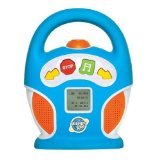
Kids MP3 Boom Box


Description
- 1.5" LCD Display
- Built in speakers
- SD memory card slot (memory card not included)
- Kid Friendly Buttons
- Headphone Jack
To start the Discovery Kids Mp3 Musical Player Boom Box the Manufacturer states:
1. Install the Batteries (they stated that the batteries should be installed so that the end of the battery that matches the - or + should be facing up).
2. Once the batteries are installed and the cover is secure turn the unit to the ON position.
3. PRESS AND HOLD DOWN the Green button (with the music note) on front of the unit for several seconds.
4. Once the screen lights up press the Green button again and the unit will start playing.
Operating system: Windows 2000, XP, VISTA, Mac OS X up to 10.5. Includes 20 pre-loaded songs. Uses 4 AA batteries (not included). Cannot play MP4 files, including content purchased through iTunes. iTunes users can convert non-digital rights management-protected MP4s into a playable MP3 format by choosing the files and selecting "Create MP3 version" from the right-click menu. Includes USB cable.
1.5" LCD Display
Built in speakers
Kid Friendly Buttons
SD memory card slot (memory card not included)
Headphone jack
- 1.2 pounds
Manufacturer Recomended Age: 3 years and up
Shipping & Delivery
Your order is shipped from the USA and delivered to your door in South Africa in 10–20 working days. All items are fully tracked.
Returns & Exchanges
We offer a 30-day return window. If something isn't right, contact our support team and we'll make it right.