
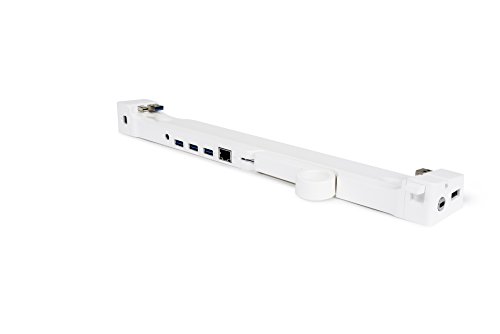
13-inch LandingZone 2.0 PRO Secure Docking Station for The 13-inch MacBook Air Model A1466 Released 2012 to 2017
Product Description
13-inch LandingZone 2.0 PRO Secure Docking Station for The 13-inch MacBook Air Model A1466 Released 2012 to 2017
- NOT COMPATIBLE WITH THE NEW MACBOOK AIR RELEASED IN 2018 WITH USB TYPE-C PORTS.
- Mini DisplayPort supports Apple Thunderbolt Display (model A1407), Thunderbolt devices, and other non-Thunderbolt monitors.
- Designed for MacBook Air Model A1466 and other 13" MacBook Air models using a MagSafe 2 power adapter released from 2012 to 2017. Dock your MagSafe 2 Power Adapter in order to charge your MacBook while on the LandingZone.
- Provides a Gigabit Ethernet port without the need for an Apple adapter cable. Supports Windows and Mac OS for MacBook Air.
- Connect a monitor, hard drive, printer, smart phone, tablet, etc. with its built-in USB Hub with 4 USB 3.0 ports.
Your lightweight Macbook Air just got a whole lot more powerful with this stylish docking stations. Turn your MacBook Air into a fully functional desktop system. No need to plug in cables each time you connect. Leave your cables plugged in. This full PRO version brings you, a 4-port USB and Ethernet Hub (power adapter included), plus a Security Slot. This device works with the 13-inch MacBook Air models released from mid-2012 to 2017. LandingZone PRO is an attractive and simple to use secure docking station for the Macbook Air. You can return from traveling with your computer and simply snap it into the LandingZone on your desk and enjoy the benefits of a complete desktop workstation. If you experience any issues with the LandingZone 2.0 PRO, please try power-cycling the docking station. To power-cycle the docking station, begin by disconnecting all devices and cables (including the power adapter) and restarting your MacBook. Once your MacBook has rebooted, connect the power adapter and dock the MacBook. Once the MacBook is docked, plug in your devices one at a time and make sure they work. If you continue to experience any issues, please contact LandingZone Customer Support for further assistance.
Technical Specifications
You might also like
Apple Magic Mouse 2 (Wireless, Rechargable) - Silver

LandingZone DOCK Docking Station for the MacBook Pro [Model A1425 & A1502] with Retina display (13-inch MacBook)

Apple Magic Keyboard with Numeric Keypad (Wireless, Rechargable) (US English) - Silver
Apple Magic Keyboard (Wireless, Rechargable) (US English) - Silver

Logitech K750 Wireless Solar Keyboard for Mac — Solar Recharging, Mac-Friendly Keyboard, 2.4GHz Wireless - Silver

Apple USB-C Charge Cable (1 m)

Cable Matters SuperSpeed USB 3.0 to HDMI Adapter (USB to HDMI Adapter / USB 3 to HDMI Adapter) for Windows up to 1440p White - Support USB 3.0 to DVI / USB 3 to DVI

LandingZone Docking Station for The 13-inch MacBook Pro [Model A1706 Released 2016/2017 & Model A1989 Released 2018] with Touch Bar and with 4 USB Type-C Ports
Apple Magic Trackpad 2 (Wireless, Rechargable) - Silver