9th & Vine

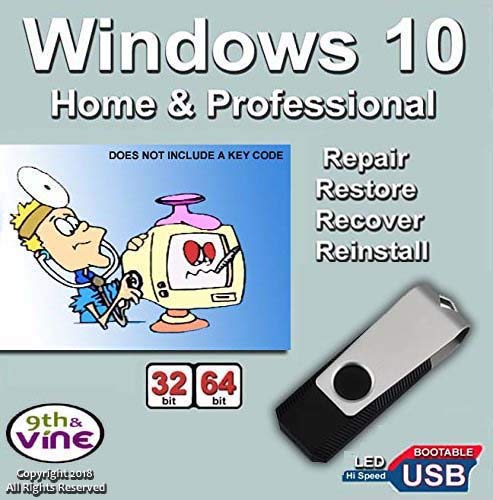
USB Flash Drive Compatible With Windows 10 Home & Professional 32/64 bit. Install, Repair, Restore & Recovery USB Drive For Legacy Bios


Free shipping with 3 or more products in your cart
Payflex: Pay in 4 interest-free payments of R282.50. Read the FAQ
R 1,130
In stock
Duties, insurance and VAT included
Delivered in 10–20 working days —
Free shipping with 3 or more products in your cart
Secure checkout
Your payment is fully protected
Duties & VAT included
No surprise charges at the door
Tracked delivery
Track your order end to end
Returns support
30-day return window

Description

  • Install, repair or restore your operating system.
  • Perfect for installs that are corrupted or full of viruses.
  • Repair BOOTMGR is missing, NTLDR is missing, Blue Screens of Death (BSOD) and more.
  • Works on any make or model computer, as long as you have a valid product key to install.
  • THIS ITEM DOES NOT INCLUDE A KEY CODE. YOU MUST HAVE A KEY CODE TO USE THE REINSTALL OPTION.
  • Are you getting any of these problems?
  • * Your operating system has crashed during an update
  • * Can't boot because Boot Manger or Boot.ini is missing
  • * BOOTMGR or NTLDR is missing
  • * System repeatedly returns to the Advanced Boot Options Screen
  • * Fatal System" error or "Blue-Screen of Death" after an update
  • * Running Slow, Virus, spyware, or malicious software problems
  • This Product is EASY to use. Repair, Restore, Recover or Re-Install and Save Time and Money and Fix your computer yourself in minutes
  • RESTORE: Restore your PC to an earlier working date that was previously saved and make your computer run like new! Does not require a key code
  • REPAIR: Searches for problems and attempts to automatically fix them. Command-line prompt for manual advanced recovery. Does not require a key code
  • RECOVER: Complete PC Backup and Recovery of a previous saved recovery. Does not require a key code
  • RE-INSTALL: Re-Install operating system to Factory Fresh eliminating Bloat ware, Viruses and spyware. A key code IS REQUIRED to activate, register and get future updates
  • Install option is a trial version that expires in few days and you will get a non authentic message if you do not enter a key code or use a non genuine key or use a key that has been used many times & blocked
  • EASY TO USE
  • 1) Insert the USB drive in the PC/Laptop
  • 2) Boot the Laptop or the PC
  • 3) Push F2 or F12 or other F function to access boot setup menu and select to Boot from USB Device. Push Enter and follow screen instructions
  • NOTE: This is not an OEM software but a repair Product. Key Code, COA & License are NOT INCLUDED. Instructions are included

    Technical Specifications
    Manufacturer
    Syshoptech
    Model
    8541574628
    Height
    22.9 cm
    Length
    15.2 cm
    Width
    0.5 cm
    Shipping & Delivery

    Your order is shipped from the USA and delivered to your door in South Africa in 10–20 working days. All items are fully tracked.

    Returns & Exchanges

    We offer a 30-day return window. If something isn't right, contact our support team and we'll make it right.