
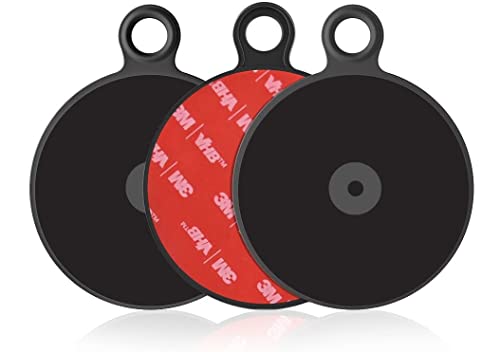
APPS2Car Dashboard Pad Mounting Disk for Suction Cup Phone Mount, 3Pcs 3" (76mm) Ultra Sticky Heat-Resistant Replacement Disc for Vacuum Suction Phone Holder, Dash Mount, GPS Holder Suction Mount
Product Description
APPS2Car Dashboard Pad Mounting Disk for Suction Cup Phone Mount, 3Pcs 3" (76mm) Ultra Sticky Heat-Resistant Replacement Disc for Vacuum Suction Phone Holder, Dash Mount, GPS Holder Suction Mount
- Important Compatibility Notice - Not for Curved or Textured Dashboards: For effective adhesion, use it only on flat, smooth and clean surfaces. Not compatible with uneven, textured, leather, oily, or curved dashboards. Always make sure the surface is clean and completely dry before sticking. Press firmly for at least 10 seconds and allow 24 hours curing time before attaching any mount to ensure a secure hold. The pad is designed for one-time use only
- Universal Compatibility - Fit for Most Suction Cup Mounts: This dashboard mounting disk fits any suction cup mount/accessory≤76mm (3") diameter. A simple solution for mounts that require a smooth adhesive platform, it works seamlessly with suction cup phone holders, stick-on magnetic mounts, GPS navigators, and more
- Value 3 Pack - Easy to Apply & Replace: Comes with 3Pcs 76mm adhesive pads, providing backups for multiple vehicles or future replacements. Quick-to-install and convenient for long-term use
- High-Performance Adhesion: Made with original 3M VHB GPH-160, providing superior bonding strength-even in high-temperature environments. Stronger and more reliable than most standard adhesive pads
- Effortless Installation: Installing the phone mount sticky pad is a breeze. Simply ensure the mounting surface is clean, dry, and no dust, oil, or residue. No tools required for installation - just peel, stick, and secure your devices
Universal Compatibility
This 3M Adhesive Dashboard Pad is compatible with all APPS2Car Dashboard Suction Cup Mounts for smartphones, and Garmin, TomTom GPS mounting pedestals.
Dashboard Pad Mounting Instructions
1. Choose the location you would like to apply the disk and clean the dashboard surface area thoroughly to remove any dust or debris. Allow the area to dry completely before applying the mounting disk.
2. Remove the paper cover from the dashboard pad.
3. Stick the pad on the cleaned dash surface, and rub firmly over surface to ensure a strong adhesive grip. And remove the protective film.
Note: Let the adhesive set for 3 hours before installing suction cup mount. According to customer reviews, it is better to let it set for 24-48 hrs before attaching suction cup mount onto it.
4. Place the suction cup of the pedestal (sold separately) firmly down on the center of the mounting pad and lower the securing lever.
Note:
* Do not place the mount in or near an air bag deployment zone or where it will obstruct view of the road or hinder vehicle operation. Please mount it on a flat surface.
** Each pad is one-time use only. Once removed, it can not be reapplied.
Removal Tip
To remove the Adhesive Dashboard Pad, pull up on the ring tab slowly. If you feel a lot of resistance, slide dental floss or a plastic slice under the pad to help loosen the seal. Slide in and lift it up slowly little by little, do not rush.
Package
3 Pcs Dashboard Pad
Technical Specifications
You might also like

Arkon 90mm Adhesive Mounting Disk for Car Dashboards Garmin TomTom GPS Dashboard Disc

iOttie Adhesive Dashboard Pad for Car Mounts Dashboard Pad

MGQFY 4 PCS 80mm (3.15") Circular Double Side Sticker Dashboard Adhesive Replacement Compatible with Xiaoyi Camera/Car Mount/Windshield Pad Mounting Disk for Suction Cup Car Phone Holder Bracket GPS
Car Tablet Holder, Linkstyle Tablet Dash Mount Holder for Car Windshield Dashboard Universal Tablet Car Mount with Suction Cup Compatible for Samsung Galaxy Tab/iPad Mini Air 4 3(All 7-10.5" Tablets)
OHLPRO Car Tablet Mount Holder,Dash Tablet Holder for Car Windshield Dashboard Universal 360 Degree Rotation for iPad Mini 4/3/2/1Samsung Galaxy Size7/8/9.7/10.5 inch TPU Suction Cup Viscosity Mount

Miracase Cell Phone Holder for Car,Upgrade Dashboard & Windshield 360° Rotation One Button Car Phone Mount Holder Compatible iPhone Xs MAX/XS/XR/X/8plus/7/8/6,Galaxy S10/S9/S8,Google,Huawei(4”-6.5“)
VANMASS Wireless Car Charger Mount, Automatic Clamping Qi 10W 7.5W Fast Charging 5W Car Mount, Windshield Dashboard Air Vent Phone Holder Compatible with iPhone Xs Max XR 8, Samsung S10 S9 S8 Note 9

Randconcept - 95mm 3M VHB Adhesive Dashboard Pad Mounting Disk for Suction Cup Phone Mount & Garmin GPS Suction Mount | 3.74" Wide Diameter 2 Pcs

Car Tablet Mount Holder, 2 in 1 Universal Windshield & Dash Mount, Adjustable Car Phone Holder with Suction Cup Compatible with Samsung Galaxy/iPad Mini/iPad Air/iPad Pro/iPhone