Arcteryx Sabre Jacket - Men's Umber Medium
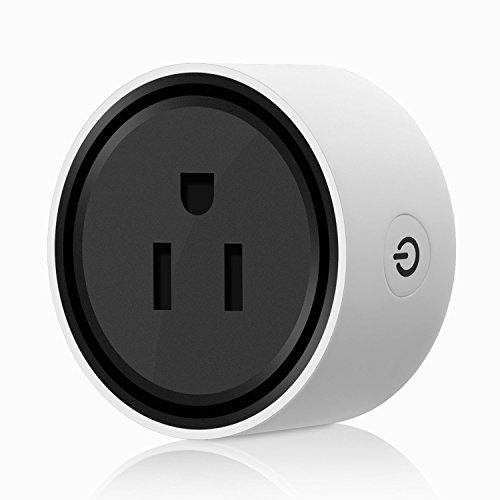
This product is not only a socket, it is also an excellent present or a gift to give your friends, or to be a fashionable household decoration.
Smart Configuration to Wireless Router
Installation steps
1. Plug the Wifi Smart Socket into a wall socket.The indicator light will flicker quickly.Hold the power button for 5 seconds until the indicator light flickers more slowly(in 1 second intervals).
2. Connect your mobile to your Wireless router (please note the password is Your WiFi password).
3. Open the Smart APP on your mobile device and click the ""+"" icon in the top right corner, and select ""Smartplug"" in the list of devices.
4. Enter the login details for your Wireless connection and click ""Smart Config"".
5. Once the configuration complete, the indicator light will stop flickering and the device will be added to the ""Device List"".
Note
※ Please check if there is damage caused by transportation, if yes, please contact supplier for replacement.
※ Please follow the specification instruction and notice to keep products in a good and safe use condition.
※ Put the socket in proper condition and out of reach of the children.
※ Plug in fully to the socket while using.
※ The total power of being electric connected appliance could not be bigger than the maximum power of the socket.
※ Do not disassemble or install the socket, otherwise there may cause security risks.
※ How to return factory reset? →just push Xiao Zhi middle power button, when the light is flickering fast, the Smartplug is without a wireless connection, this socket will return to factory reset.
Parameters
Brand: AuYou
Product: Wifi Smart Socket
Rated Current: 110V
Rated Current: 10A
Max. Load Power: 1100W
AC Frequency:50/60HZ
Package Includes:
1 x WIFI Smart Socket
1 x User Manual"
| Country | USA |
| Brand | AUYOU |
| EAN | 0603161052910 |
| Label | AuYou |
| Manufacturer | AuYou |
| MPN | AuYou-001 |
| PartNumber | AuYou-001 |
| Publisher | AuYou |
| Studio | AuYou |
| ReleaseDate | 0000-00-00 |