
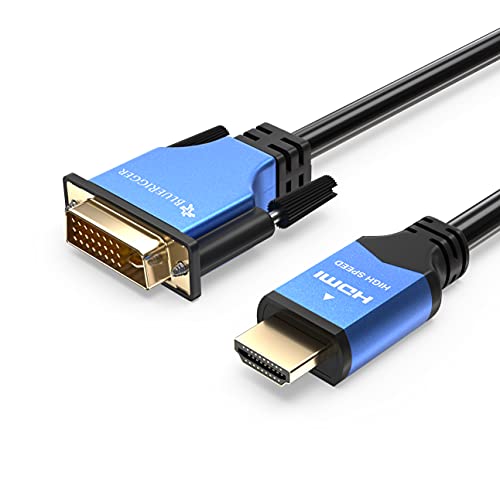
DVI to HDMI Adapter Cable 3FT (High-Speed, Bi-Directional, Gold Plated Male to Male, 1080p) - HDMI to DVI Cable for Raspberry Pi, Roku, Xbox, PS5/PS4/PS3, Graphics/Video Card, Monitor HDTV



Description
- ➤ BI-DIRECTIONAL CABLE: BlueRigger DVI-D to HDMI cable supports two-way connectivity. It can connect HDMI-enabled source devices such as Laptop, Desktop, Blu-Ray, Raspberry Pi, Streaming devices, HDTV, Gaming Consoles (Xbox 360/One, PS3/4/5, Wii) to your DVI-enabled devices such as a Monitor, Projector, Video Card, Graphics Card ➤ Note: Supports both DVI-to-HDMI and HDMI-to-DVI transmission
- ➤ EASY SETUP: This computer monitor cable supports 1080p Full HD resolution & is backward compatible. Ideal as an hdmi cable for monitor or computer monitor cord ➤ NOTE: This DVI to HDMI Cable supports Digital Signals only. Supports both DVI-D (24+1) & DVI-I (24+5). Does NOT support DVI-I analog signal
- ➤ STRONG ANTI-INTERFERENCE: HDMI to DVI adapter cable features a durable aluminum alloy shell, & flexible PVC jacket to provide maximum protection from EMI & RFI interference. Corrosion-resistant 24K Gold plated connectors and oxygen free copper wires for optimal conductivity. DVI connector includes non-slip screws that secure tightly to your monitor
- ➤ SOUND TRANSMISSION: Newer generation Graphic Cards such as Nvidia 8000-series, ATI/AMD HD5000-series, Radeon 2000 (or newer) are able to transmit sound through Sound Chips in them. ➤ NOTE: PLEASE ensure that the latest graphic cards & newest audio drivers are installed
- ➤ LIFETIME WARRANTY: BlueRigger Lifetime Warranty and US-based customer support
The BlueRigger HDMI to DVI Adapter Cable will connect any DVI-equipped monitor or TV set to any HDMI-equipped device such as Blu-Ray, PlayStation 3 or Xbox 360. These cables help you extract maximum performance from your gaming or home theater set up.
Use with Blu-Ray Players, Gaming Consoles
This BlueRigger HDMI to DVI Adapter Cable connects computers & other source devices with HDMI outputs such as Blu-Ray players, Xbox 360 to DVI-equipped televisions or monitors. It provides maximum support for resolutions up to 1920 x 1200. This cable supports high-bandwidth, uncompressed video & provides your system with high-definition video quality.
Convert your Computer into a Home Entertainment Center
With this cable you can watch computer based media on your TV or a projector. It connects computers with DVI connections such as home-theater PCs, Mac minis, & some laptops-to a HDMI-equipped HDTV or other display device with HDMI connection.
Compatibility
- Connect your DVI-equipped device to an HDMI-equipped HDTV or other digital display
- Connect your HDMI-enabled devices such as computer, Blu-Ray, PlayStation 3, Xbox 360 to a DVI-equipped monitor or TV
Note: HDMI to DVI does not pass audio. A separate audio cable must be used for audio.
Gold-Plated Connectors for Optimal Clarity
The cable has a robust PVC outer layer, gold-plated HDMI A Male to DVI Male connector that offer protection from RF & EM interference. These connectors also resist corrosion while providing optimal signal transfers.
Warranty
All BlueRigger cables & adapters are backed by a Limited Lifetime warranty. Please contact us via email if you have any questions.
Technical Specifications
Shipping & Delivery
Your order is shipped from the USA and delivered to your door in South Africa in 10–20 working days. All items are fully tracked.
Returns & Exchanges
We offer a 30-day return window. If something isn't right, contact our support team and we'll make it right.


