
Wolfwhoop WR832 5.8GHz 40CH Wireless FPV Receiver for Racing Drone and Multicopter
Other video capture come with CD software, but sometimes lost your CD or software license key? Poor help and support!
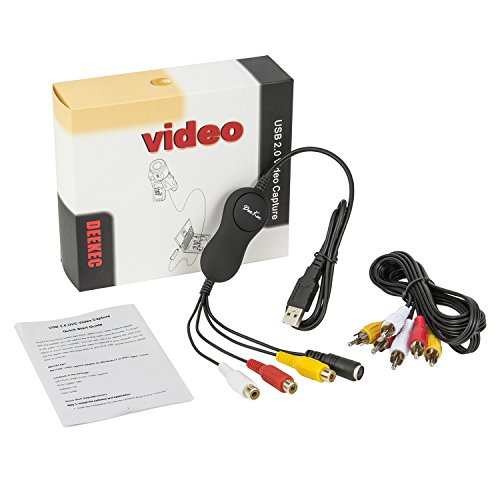
DK175VC video capture adapter maybe a better choice, you do not need to install the driver and find the CD anywhere.  1. No need drive. 2.Open source OBS Studio, work for windows,MAC and Linux.
Interface:
USB PORT -Connect the USB port of device to an available USB 2.0 port on your computer(preferably a port on the real panel).
AUDIO INPUTS (red and white) - Use standard RCA cables to connect these left and rightaudio inputs to the left and right audio outputs of your playback device. Besure to match the colors properly - red to red (right channel), white to white (leftchannel).
COMPOSITE VIDEO INPUT (yellow) - Use a standard composite video cable to connect thisinput to the composite video output of your playback device.
S-VIDEO INPUT (black) - Use a standard S-Video cable to connect this input to theS-Video output of your playback device.
Attention:
Please don't connect composite video and S-Videoat the same time.
Resolution:
NTSC:720 x 480 @ 30fps
PAL: 720 x 576 @ 25fps
System Requirements:
* P4 1.7GHz CPU or above
* 512MB RAM
* VGA card with 32MB memory
* One available USB 2.0 port
* Compatible Windows-sound card
* Microsoft windows(7,8,10)/MAC(before version 10.13.1)/Linux
Software:
OBS Studio, easy to learn and use.
Included:
1 x DK175VC Video Capture Adapter
1 x RCA Cable (1.5M)
1 x Service Card (any trouble, please contact us as soon as possible)
1 x User Guide
| Country | USA |
| Binding | Electronics |
| Brand | Deekec |
| Color | Black |
| Label | Deekec International |
| Manufacturer | Deekec International |
| Model | DK175VC |
| MPN | DK175VC |
| OperatingSystem | Windows 10 |
| PartNumber | DK175VC |
| Publisher | Deekec International |
| Studio | Deekec International |
| ReleaseDate | 0000-00-00 |