
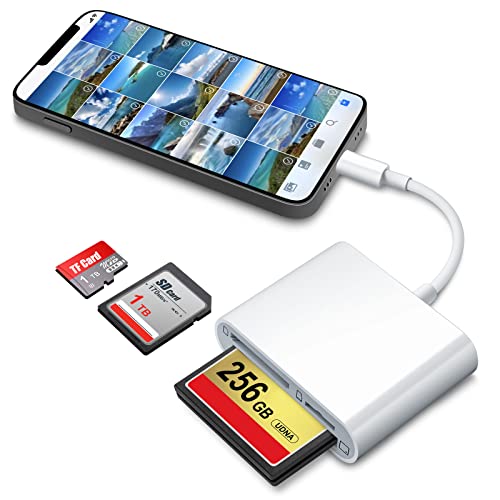
DenicMic SD CF Card Reader Compatible with iPhone 14 13 12 11 X XS/iPad with Lighting Ports SD CF TF Memory Card Reader Adapter Digital Trail Game Camera Accessories No Need App
Product Description
DenicMic SD CF Card Reader Compatible with iPhone 14 13 12 11 X XS/iPad with Lighting Ports SD CF TF Memory Card Reader Adapter Digital Trail Game Camera Accessories No Need App
Warm Tips:
1. Wi-Fi SD card is not supported.
2. Please Remove Phone Case before use.
3. SD/TF/CF card interfaces can't be used simultaneously.
4. Memory cards are not included.
Support:
Easily copy photos/videos from cameras and share them on social network freely.
Copy the movie from card to your iPhone & iPad and watch and edit them easily.
Two-way transfer on iOS 13 device. Support to transfer files in most formats.
Compatibility:
iPhone Models: iPhone 11, X, 8 Plus, 8, 7 Plus, 7, SE, 6S Plus, 6S, 5,ect.
iPad Models: iPad Mini, Mini 2, Air, Air 2, Mini 3, Mini 4, Pro (9.7-inch), Pro (10.5-inch), Pro (12.9-inch).
Troubleshooting:
1.There's no pop-up on iOS 13 device, please click 'Photos' APP on iOS 13 device and find 'Import'.
2.If photos or videos aren't transferring, be sure the memory card is inserted properly into the reader. Completely unplug the Card Reader and memory card, then reconnect them and try again.
3.Check if the iOS is updated to iOS 9.2 or above for iPhone and iOS 8.0 or above for iPad.
4.If photos were not taken by the digital camera, use your computer, create a folder called "DCIM" to the root of your memory card. Copy the photos and videos into the DCIM folder. Rename each photo and video file as "IMG_XXXX", where XXXX is a unique number. For example, if you had one JPG file and one .MOV file, name them "IMG_0001.JPG" and "IMG_0002.MOV".
5.Using MediaInfo to check if the video files are H.264 or MPEG-4. If not, the video should change the format into H.264 or MPEG-4 and try again.
Technical Specifications
You might also like
UGREEN SD Card Reader USB 3.0 Card Hub Adapter 5Gbps Read 4 Cards Simultaneously CF, CFI, TF, SDXC, SDHC, SD, MMC, Micro SDXC, Micro SD, Micro SDHC, MS, UHS-I (Black)

SanDisk Extreme 64GB CompactFlash Memory Card (SDCFXSB-064G-G46)

USB C CF Card Reader, Rocketek Compact Flash CF Card Reader 3-in-1 Micro USB to USB Type-C OTG Adapter/USB 3.0 Portable Memory Card Reader for SDXC/SDHC/SD, MMC, Micro SD/SDXC/SDHC Card and UHS-I Card

SanDisk Extreme PRO 64GB Compact Flash Memory Card UDMA 7 Speed Up To 160MB/s - SDCFXPS-064G-X46
QUMOX SD SDHC SDXC to CF Compact Flash Memory Card Adapter Reader Type 1 WiFi …

Unitek USB C SD Card Reader, Aluminum 3-Slot USB 3.0 Type-C Flash Memory Card Reader for USB C Device, Supports SanDisk Compact Flash Memory Card and Lexar Professional CompactFlash Card - Grey

Cateck Aluminum Superspeed USB 3.0 Multi-in-1 3-Slot Card Reader for CF/SD/TF/Micro SD for iMac, MacBook Air, MacBook Pro, MacBook, Mac Mini, PCs and Laptops

USB C Card Reader,Stouchi USB C to Compact Flash CF Card Reader 3 in 1 USB 3.1Type C 5 Gbps Data Transfer to SD/TF Micro SD/CF Support SanDisk for MacBook Pro, ChromeBook Pixel, Lexar and More