
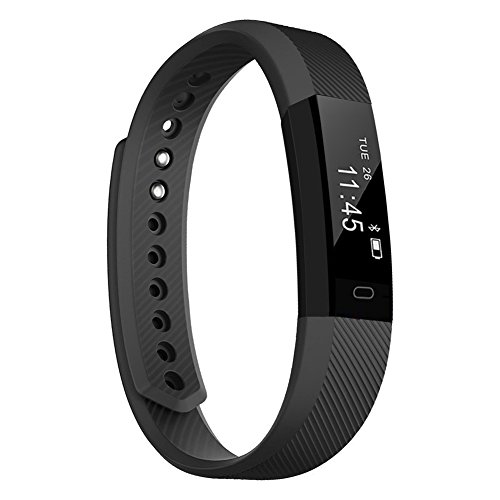
Fitness Trackers TopBest Remote Self-Timer Slim New Smart Bracelet Bluetooth Call RemindCalorie Counter Wireless Pedometer Band Sport Sleep Monitor Activity Tracker For Android iOS Phone

Product Description
Fitness Trackers TopBest Remote Self-Timer Slim New Smart Bracelet Bluetooth Call RemindCalorie Counter Wireless Pedometer Band Sport Sleep Monitor Activity Tracker For Android iOS Phone
- Host with built-in USB plug (no cord needed), easy to get charged on USB charger or PC, a full charge lasts 5-7 days.
- Get call, text notification on your wrist without keeping an eye on the phone, never miss an important message.
- Easy to check your daily data on app, automatically track steps, distance, calories burned and sleeping burned on the screen,act as a timer.
- Notification Remind : intelligent notification be clear at a glance, convenient and timely access to telephone, SMS, and all kinds of social information. Through touch button began to ring view information content. sedentary reminder,remind you to leave the seat for just the right amount of exercise;
- With convenient charging way, simply take the band off and plug it into any USB outlet and a red light comes on.
Fit is not a destination, it is a way of life.
Characteristics:
CPU:Â Nordic Sensor: kionix
Charging time: About 1.5 hours
Product weight: 18g
Band material: TPE
Charging Port: USB charge
Working Voltage: 3.6~4.2 V
Screen Size:0.86 inch OLED screen Battery Capacity and Battery
Type: 50mAh Polymer Rechargeable Li Battery
Anti-dust and Waterproof rating: IP 67 Life-level waterproof, sweat-proof, rain-proof,
but do not wear it when you are showering and swimming.
 FAQ:Â
 Q: How to connect?
 A: 1. Charge the bracelet to activate it;
2. Download the APP "Veryfit 2.0" from Apple Store or Google Play;
3. Open the APP search your bracelet name, and connect. If not found,
please refresh several times (note: within 0.5 meters from the phone);
4. once it paired correctly, the bracelet vibrates, the time on the bracelet will be auto synchronized with phone's.
 Q: How to reset the device? (this is to reboot device).  A: Please go to the app Veryfit2.0→ User → System Setting → Restart Device → Confirm> Reboot.
 Q: Can't pair the device?
 A: 1. check phone bluetooth list, forget all device ever connected.
2. go to app-device-unbind device, disconnect it.
3. then connect it again. Â Q: About charging and battery life.
 A: Please charge it on USB plug, charge time: 1-2 hours.
We recommend charging your device every few days to ensure you are always tracking.
 TopBest Smart Bracelet can remind you to do more exercise
 Standard packing:
1 * smart bracelet
1 * user manual
1 * packing box
Technical Specifications
You might also like
100 LED 33FT Copper Wire Solar Outdoor Waterproof Fairy String Lights (White)
Baseus iPhone Headphone Adapter [Upgrade],Lightning to 3.5mm Aux Headphone Jack Audio & Charge Cable Adapter for iPhone 7/7Plus (Support iOS 10.3; iOS 11)

KeNeer Corner Guards with Double Sided Oily Adhesive, Baby Safety Clear Table Edge Protector, Suitable for Chair, Cabinet and Shelves (12pack Triangle Shaped & 12pack Ball Shaped with Backup Adhesive)
Magnetic Blocks, 3D Building Blocks Toys Set 87Pcs, Magnetic Tiles, Educational Toys for Baby/ Kids (ASTM and ROHS certification)

Alarm Clock, Chelvee 3” Quartz Analog Alarm Clock with Night Light, Ultra Small, Silent with No Ticking (Black)

YINGXIANG Globe String Light 8.2Ft LED Decorative String Lights for Garden,Wedding,Xmas Party,Patio, Backyard,Cafe,Christmas,Party,Bedroom,Tapestry(Warm White)

[Pack of 4]LED Night Light Veatool 0.5W Plug-in Wall Lamp with Smart Sensor for Kids Babies Bedroom Nursery