
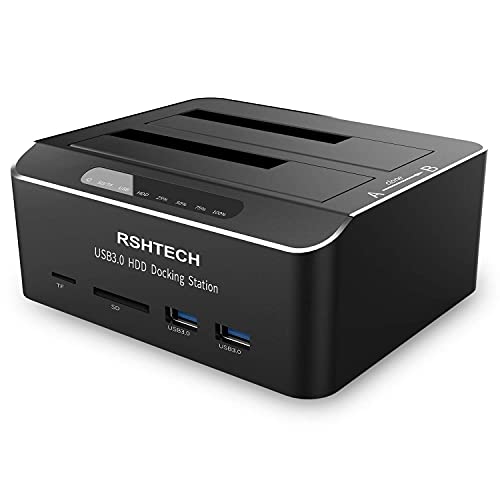
Hard Drive Docking Station RSHTECH USB 3.0 Aluminum Dual Bay Hard Drive Dock for 2.5" & 3.5" SATA HDD SSD with SD/Micro SD Card Reader and Offline Clone/Duplicator Function Support 16TB Tool-Free
Product Description
Hard Drive Docking Station RSHTECH USB 3.0 Aluminum Dual Bay Hard Drive Dock for 2.5" & 3.5" SATA HDD SSD with SD/Micro SD Card Reader and Offline Clone/Duplicator Function Support 16TB Tool-Free
- Dual Bay Hard Drive Docking Station: Aluminum HDD dock supports Standard Desktop 2.5"/3.5" SATA I/II/III Hard Drives or SSD and UASP protocol, Supports hard drives up to 16TB
- Hard Drive Offline Clone Function: USB 3.0 to SATA hard drive dock support offline clone, no drivers needed, easy installation; cloning can only be done from A drive to B drive, make sure the memory capacity of B drive is larger/equal than A drive. The target disk must be larger/equal than the source disk
- UASP Super Speed: All in one hard drive docking station for superspeed file data transfer up to 6Gbps, It is faster than traditional USB 3.0 connections. External hard drive dock has 2 USB 3.0 ports and SD/Micro SD/TF card reader in front, Plug and Play, no reboot or additional drivers needed, easy and quick Tool-Free installation
- Stable & Reliable DC Power Source: The SATA HDD dock duplicator with highly efficient 36W (12V/3A) power supply, stable and reliable power source guarantees a steady supply of energy. Automatic sleep mode after 10 minutes of inactivity saves energy
- Broad Compatibility: External hard drive reader compatible with Windows 2003/XP/Vista/Win 7/Win 8/Win 10/Win 11, Mac OS, Linux 9 and above, PS4 , PS4 Pro, Xbox 360, Xbox one, backward compatible with USB 2.0/1.1 connections
RSHTECH Dual Bay SATA Hard Drive Docking Station equips 4-in-1 function, including storage, clone, USB hub, and Card reader.
Supports UASP protocol:
UASP (USB Attached SCSI Protocol): supports for HDD/SSD faster transfer performance, 70% faster than traditional USB 3.0, requires UASP capable host controller and operating system. (Real-world performance depends on the disk drive and host system.)
Supports up to 2x 12TB hard drive:
USB 3.0 dual-bay Hard Drive Docking Stations can access both disks simultaneously. Maximum Capacity of 2x 12TB.
Offline Clone Function:
-Ensure the Power Switch on the rear is in the OFF Position and plugged in properly.
-Insert Both hard drives and identify Source Disk and Target Disk (Make sure the memory capacity of B drive is larger/equal than A drive )
- Make sure that the USB cable is disconnected from any computer during the cloning.
- Press the "Clone" button for 3 seconds until the LED starts to flash and the cloning process begins.
-Progress indicator with LED: 25% - 50% - 75%-100%. When offline clone operation is fully completed, all LEDs will constant on.
Note:
-The offline clone function cannot be processed if there are bad sectors or tracks on the hard disk.
- Do not try to remove your HDD or SSD device while it is active. Please power off the docking station before removing.
-Please backup files in the target hard drive before cloning. Any files in the target hard drive will be overwritten when offline cloning occurs.
- If you are mounting a drive which larger than 2TB, please initialize with Partition Style GPT.
- If you are using desktop computers, then the USB3.0 cable needs to be plugged in the rear port of the computer.
Package Includes:
1 x Dual Bay SATA Hard Drive Docking Station(RSH-DS02)
1 x 12V/3A DC Power Adapter
1 x USB A to A Cable
1 x manual
Technical Specifications
You might also like

Samsung SSD 860 EVO 1TB 2.5 Inch SATA III Internal SSD (MZ-76E1T0B/AM)
SK hynix Gold S31 500GB 3D NAND 2.5 inch SATA III Internal SSD
Seagate BarraCuda 4TB Internal Hard Drive HDD - 3.5 Inch Sata 6 Gb/s 5400 RPM 256MB Cache for Computer Desktop PC - Frustration Free Packaging (ST4000DM004)

Seagate 16TB HDD Exos X16 7200 RPM 512e/4Kn SATA 6Gb/s 256MB Cache 3.5-Inch Enterprise Hard Drive (ST16000NM001G)
SSK Aluminum M.2 NVME SSD Enclosure Adapter, USB 3.1 Gen 2 (10 Gbps) to NVME PCI-E M-Key Solid State Drive External Enclosure (Fits only NVMe PCIe 2242/2260/2280)
Seagate BarraCuda 8TB Internal Hard Drive HDD - 3.5 Inch Sata 6 Gb/s 5400 RPM 256MB Cache for Computer Desktop PC - Frustration Free Packaging (ST8000DM004)

Samsung 860 QVO 1TB Solid State Drive (MZ-76Q1T0) V-NAND, SATA 6Gb/s, Quality and Value Optimized SSD

Seagate FireCuda Gaming (Compute) 2TB Solid State Hybrid Drive Performance SSHD - 2.5 Inch SATA 6GB/s Flash Accelerated for Gaming PC Laptop - Frustration Free Packaging (ST2000LX001)
SSD Mounting Bracket, SNANSHI SSD Bracket 2.5 to 3.5 Adapter SSD HDD Metal Mounting Bracket Adapter Hard Drive Holder for PC SSD (Pack of 2)