
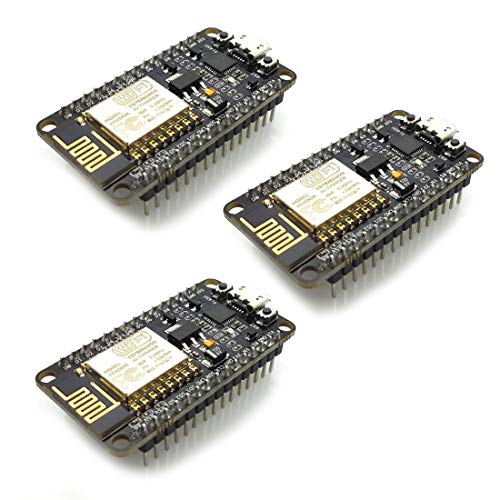
HiLetgo 3pcs ESP8266 NodeMCU CP2102 ESP-12E Development Board Open Source Serial Module Works Great for Arduino IDE/Micropython (Large)
Product Description
HiLetgo 3pcs ESP8266 NodeMCU CP2102 ESP-12E Development Board Open Source Serial Module Works Great for Arduino IDE/Micropython (Large)
- Built-in Micro-USB, with flash and reset switches, easy to program
- Arduino compatible, works great with the latest Arduino IDE/Mongoose IoT/Micropython
- Data download access to the website: http://www;nodemcu;com
ESP8266 is a highly integrated chip designed for the needs of a new connected world. It offers a complete and self-contained Wi-Fi networking solution, allowing it to either host the application or to offload all Wi-Fi networking functions from another application processor.
Instruction & Steps of How to use:
1. Download the Arduino IDE, the latest version.
2. Install the IDE
3. Set up your Arduino IDE as: Go to File->Preferences and copy the URL below to get the ESP board manager extensions: http://arduino.esp8266.com/stable/package_esp8266com_index.json Placing the http:// before the URL lets the Arduino IDE use it...otherwise it gives you a protocol error.
4. Go to Tools > Board > Board Manager> Type "esp8266" and download the Community esp8266 and install.
5. Set up your chip as:
Tools -> Board -> NodeMCU 1.0 (ESP-12E Module)
Tools -> Flash Size -> 4M (3M SPIFFS)
Tools -> CPU Frequency -> 80 Mhz
Tools -> Upload Speed -> 921600
Tools-->Port--> (whatever it is)
6. Download and run the 32 bit flasher exe at Github(Search for nodemcu/nodemcu-flasher/tree/master/ at Github)
github.com/nodemcu/nodemcu-flasher/tree/master/Win32/Release
Or download and run the 64 bit flasher exe at:
github.com/nodemcu/nodemcu-flasher/tree/master/Win64/Release
7. In Arduino IDE, look for the old fashioned Blink program. Load, compile and upload.
8. Go to FILE> EXAMPLES> ESP8266> BLINK, it will start blinking.
Data download access to the website:
http://www.nodemcu.com/index_en.html
Firmware link:
https://github.com/nodemcu/nodemcu-firmware
Note: Please contact us if you need the driver or meet any issue when using. We provide 100% satisfication service for customers.
Package included:
3* ESP8266 NodeMCU LUA CP2102 WiFi Wireless Development Board
Technical Specifications
You might also like

HiLetgo 2pcs DHT22/AM2302 Digital Temperature And Humidity Sensor Module Temperature Humidity Monitor Sensor Replace SHT11 SHT15 for Arduino Electronic Practice DIY

Elegoo EL-CP-004 120pcs Multicolored Dupont Wire 40pin Male to Female, 40pin Male to Male, 40pin Female to Female Breadboard Jumper Wires Ribbon Cables Kit for arduino
HiLetgo 5pcs DHT11 Temperature Humidity Sensor Module Digital Temperature Humidity Sensor 3.3V-5V Humidity Measure Range 20%-95% Temperature Measure Range 0-50℃ Celsius with Dupont Wires

4PCS Breadboards Kit Include 2PCS 830 Point 2PCS 400 Point Solderless Breadboards for Arduino Proto Shield Distribution Connecting Blocks
UCTRONICS 0.96 Inch OLED Module 12864 128x64 Yellow Blue SSD1306 Driver I2C Serial Self-Luminous Display Board for Arduino Raspberry PI
MELIFE 2 Pack ESP32 ESP-32S Development Board 2.4GHz Dual-Mode WiFi + Bluetooth Dual Cores Microcontroller Processor Integrated with ESP32s Antenna RF AMP Filter AP STA for Arduino IDE

2 Pack ESP32-CAM WiFi Bluetooth Camera Module Development Board ESP32 with Camera Module OV2640

HiLetgo 10pcs 4 Channels IIC I2C Logic Level Converter Bi-Directional 3.3V-5V Shifter Module for Arduino

3Pcs DHT22/AM2302 Digital Temperature and Humidity Sensor Module for Arduino Replace SHT11 SHT15

HiLetgo ESP-WROOM-32 ESP32 ESP-32S Development Board 2.4GHz Dual-Mode WiFi + Bluetooth Dual Cores Microcontroller Processor Integrated with Antenna RF AMP Filter AP STA for Arduino IDE