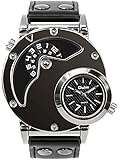
Hiwatch Binary Watch RPM Turbo Blue Flash LED Watch Black
Please be aware orders placed now may not arrive in time for Christmas, please check delivery times.
This item may be available in a different size, colour, scent, version or platform:
Hiwatch Binary Watch RPM Turbo Blue Flash LED Watch Black
Setting Instruction
S1: Mode Button ( right up ) S2: Reset Button ( right down ) D1: Show hour / month / week?right up? D2: Show minute / day ( left up) D3: Show minute (at the bottom, the smallest one)
Press"S1"button : recycling show Time / Day / Week Press"S2"button : set up Hour / Minute / Month / Day / Week / Level of Light / Auto Light Up Time
Time Reading Press"S1"to show the current time. Hour : show by D1 Minute : show by D2+D3 Continue press"S1"to show the current date. Month : show by D1 Day : show by D2 Continue press"S1"again to show the current week. Week : show by D1
Time Setting Press"S2"twice and see D1 flash, press"S1"to add hour. (PM means afternoon) Press"S2"and D2, D3 flash, press"S1"to add minute. (D3 mean 1-4 minutes, D2 add every 5 minutes) Press"S2"and see D1 flash, press"S1"to add month. Press"S2"and D2 flash, press"S1"to add day. (D3 mean 1-4 days, D2 add every 5 days) Press"S2"and see D1 flash, press"S1"to choose week. Press"S2"and see D3 flash, press"S1"to choose the level of light. (1 class means darkest, 4 class means brightest) Press"S2"and D2 flash, press"S1"to choose auto light up time. ( You can choose 5/ 10/ 15/ 20/ 30 minutes, when the minute disappear, auto light up closed) More setting details, please contact me any time.