

IKONG 8610 950 951 Compatible Ink Cartridge Replacement for HP 950XL 951XL Combo Works with HP OfficeJet Pro 8610 8600 8620 8630 8100 8625 8615 8660 8640 251DW 276DW 271DW
Product Description
IKONG 8610 950 951 Compatible Ink Cartridge Replacement for HP 950XL 951XL Combo Works with HP OfficeJet Pro 8610 8600 8620 8630 8100 8625 8615 8660 8640 251DW 276DW 271DW
- HP 950 ATTN: Any errors like 950 XL "damaged cartridges",an updated firmware will fix.Please download the latest firmware on HP's official website based on your printer model,and only by updating the firmware can continue to use our 950xl and 951xl ink .
- Package included: IKONG Compatible HP 950XL 951XL Replacement 8610 Ink Cartridge ( 5-pack,2 Black,1 Cyan,1 Magenta,1 Yellow)
- 950 951 xl compatible with: HP OfficeJet Pro 8610 8600 8620 8630 8100 8625 8615 8660 8640 251DW 276DW and 271DW printer
- Our product will be strictly inspected before leaving the factory.
- IKONG 950xl ink cartridge are through ISO 9001 & ISO14001 certified facility.
Product Name
IKONG Compatible replacement for HP 950XL 951XL Ink Cartridge ( NON-OEM)
Ink Capacity
Page Yield:about 2,300 (Black) and 1,500 (Color)
Ink Volume:
950xl black 80ML, Cyan/ magenta/ Yellow 30ML per color.
Compatible printer:
HP OfficeJet Pro 8610
HP Officejet Pro 8600 Plus-N911n
HP Officejet Pro 8620
HP Officejet Pro 8600
HP Officejet Pro 8630
HP Officejet Pro 8660
HP Officejet Pro 276dw
HP Officejet Pro 251dw
HP Officejet Pro 271dw
HP Officejet Pro 8625
HP Officejet Pro 8615
HP Officejet Pro 8640
HP Officejet Pro 8100
User Manuel
1. Please tear off the color tape before you install.(With some tissue in your hand to avoid leaking)
2. If your printer appears an alert likes "Non-Genuine" ,press "Proceed" / "Continue" / "Accept"or "OK" to ignore the prompt. Additional alerts may display when you print or copy - dismiss the alerts accordingly.
3. After new cartridges installed, if streak happens,try re aligning your printer heads,then hit your printer clean option ,try twice will fix the problem.
4. When you receive an error "Cartridge cannot be recognized" or "Replace Cartridge" , please remove the relevant ink cartridge and gently wipe their chip with a lint free cloth or rubber , eraser. If issue persists, turn off printer and unplug the power source for 30 seconds then try again.
Technical Specifications
You might also like
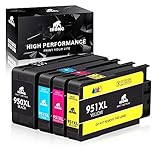
IKONG 950XL 951XL Compatible Ink Cartridge Replacement for HP 950 951 Ink Cartridge Works with OfficeJet Pro 8600 8610 8620 8100 8630 8660 8640 8615 8625 276DW 251DW 271DW

LxTek Compatible Ink Cartridge Replacement for HP 950 950XL to use with OfficeJet PRO 8610 8600 8620 276dw 8630 251dw 8100 8615 8625 8640 8660 271dw Printer, High Yield, with Smart Chip, 2 Black
Vegetable Slicer Green (Old Version)
IKONG 932XL 933XL Compatible Ink Cartridge Replacement for HP 932 933 Work with HP Officejet 6600, Officejet 6700, Officejet 7612, Officejet 6100, Officejet 7610, Officejet 7110

HP Printer Paper, Copy and Print20, 8.5 x 11 Paper, Letter Size, 20lb Paper, 92 Bright, 5,000 Sheets / 10 Ream Carton (200060C) Acid Free Paper

LINKYO Compatible Toner Cartridge Replacement for Brother TN450 TN-450 TN420 (Black, High Yield, 2-Pack)

Label KINGDOM 4 Pack Compatible Brother P-touch TZ TZe TZe-231 TZ-231 Label Tape for PT-D210 PT-H100 PTD400AD PT-P700 PTD600 PT-1230PC Labeler, 12mm (1/2 Inch) x 8m (26.2 ft) Laminated, Black on White

AmazonBasics Correction Tape, 10-Pack

V4INK Compatible Toner Cartridge Replacement for Brother TN630 TN660 TN-660 (Black, 4-Pack) for use in Brother HL-L2300D HL-L2320D HL-L2340DW HL-L2360DW HL-L2380DW MFC-L2720DW MFC-L2740DW DCP-L2540DW