
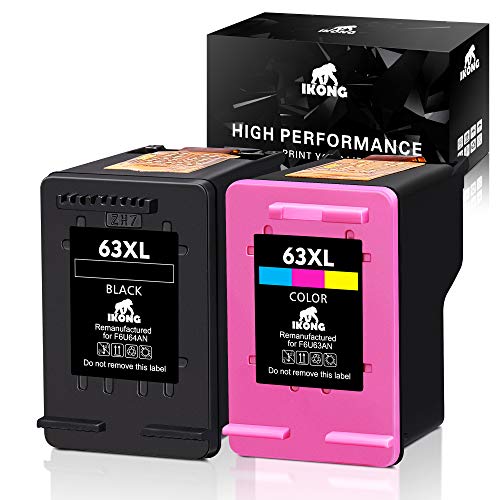
IKONG Remanufactured Ink Cartridge Replacement for HP 63 Ink with Ink Level Display,63XL Work with HP OfficeJet 5255 5258 4650 3830, Envy 4520 4516 4655, Deskjet 1112 2132 3630 3632 3634
Product Description
IKONG Remanufactured Ink Cartridge Replacement for HP 63 Ink with Ink Level Display,63XL Work with HP OfficeJet 5255 5258 4650 3830, Envy 4520 4516 4655, Deskjet 1112 2132 3630 3632 3634
- What is included: Compatible HP ink cartridge 63 Remanufactured Replacement 2-pack ( 1 Black & 1 Tri-color)
- Printer compatibility: HP OfficeJet 5255 5258 4650 3830 4655 3834 3831 3832 4652 4654 ; ENVY 4520 4516 4512 4522 ; DeskJet 2130 3634 3633 1112 2132 3630 3636 3632 3631 2133 2131 2134 1110
- Our product will be strictly inspected before leaving the factory.
- IKONG-Smart Technology: Remaining Ink levels accurately reported for compatible printers .
Model Name
HP 63 63XL Remanufactured Ink Cartridge Replacement ( NON-OEM)
Cartridge Capacity
Page Yield(approx): Page Yield(approx): 450 (Black) 350 (Color))
Printer compatibility
¡ñ ENVY Series: HP ENVY 4520,4516,4512,4522
¡ñ DESKJET Series: HP DeskJet 2130,3634,3633,1112,2132, 3630,3636,3632,3631,2133,2131, 2134,1110
¡ñ OFFICEJET Series: HP OfficeJet 4650,3830,4655,3834,3831,3832,4652,4654
User Manuel
¡ñ Removing the protective cover and label when install the new cartridges.
¡ñ When you receive an error likes"Ink Cartridge Failure" , please remove the affected cartridge and gently wipe the chip with a lint free cloth or rubber eraser. If issue persists, turn off printer and unplug the power source for 30 seconds then try again.
¡ñ After new cartridges installed, if streak or print quality happens,try to Soak the printer head for 1 minute with hot water and that should take care of this issue.
You're invited to contact us firstly if any problems occur.Our best attention, we assure you, will be paid to focus on your related requirements.
Technical Specifications
You might also like

HP OfficeJet 4650 Wireless All-in-One Photo Printer with Mobile Printing, HP Instant Ink & Amazon Dash Replenishment ready (F1J03A)
JARBO Remanufactured for HP 63XL ink cartridges High Yield, 1 Black+1 Tri-Color, with Ink Level Display Used in HP Envy 4520 4516 Officejet 4650 3830 3831 4655 Deskjet 2130 2132 1112 3630 3633 3634 36

HP DeskJet 1112 Compact Printer (F5S23A)

HP OfficeJet 3830 All-in-One Wireless Printer with Mobile Printing, HP Instant Ink & Amazon Dash Replenishment ready (K7V40A)

Kogain Remanufactured for HP 63 63XL Ink Cartridges, 1 Black + 1 Tri-Color, High Yield Work with HP Envy 4512 4516 4520 4522, DeskJet 1112 2130 3633 3634, OfficeJet 3830 3831 3832 4650 Printer
MONY Remanufactured Ink Cartridges Replacement for 63 63XL Ink Cartridges (Black & Tri-color) Used in Envy 4520 4512 Deskjet 2132 3632 3630 1112 Officejet 4650 3830 4655 Printer, Ink Level Display

Hammermill Paper, Premium Multi-Purpose Poly Wrap, 20lb, 8.5 x 11, Letter, 97 Bright, 500 Sheets/1 Ream (105910) Made In The USA