
INAIR 2 Elite Suite| AI Spatial Computer OS| AR Glasses + Pod + Keyboard| Compatible with Vast Android apps| 6-Screen Expansion| Wireless PC Streaming| 3DoF Spatial Hovering| Real‑Time 2D‑to‑3D
[Multi-Screen Spatial Desktop]: The INAIR Pod’s native 3D spatial OS lets you open up to six windows at once and switch seamlessly between 3DoF Hover Mode (fixed in space) and 0DoF Follow Mode (moves with you). Drag, resize, and rotate each window so documents, browsers, and streaming services remain visible together.
[Vast Android App Ecosystem]: A full Android environment runs directly on the Pod. Install popular productivity, media-streaming, and social apps with a single tap. Arrange them side by side in AR to check email, watch a movie, and reference web content simultaneously—no split-screen required.
[Real-Time 2D-to-3D Spatial Rendering]: INAIR’s AI spatial engine performs depth inference and 3D reconstruction on any image or video, transforming flat content into immersive stereoscopic visuals for richer viewing. Easily upload your own photos and videos from your gallery to convert personal memories into stunning 3D experiences, or activate the 3D enhancer to instantly transform content from popular streaming platforms into a dynamic, depth-filled spectacle.
[Remote PC Streaming Across Networks]: The dual-channel wireless engine mirrors Windows or macOS desktops onto a 135-inch virtual display, whether you’re on the same Wi-Fi or halfway across the world. Leave your laptop behind and securely access your remote computer to run powerful desktop applications and access your files from anywhere, at any time.
[Note]: Due to limitations from different regional carrier environments, remote cross-network streaming may not be supported on certain carrier networks in specific areas. If you encounter the same issue, you can try switching to another carrier network. Our R&D team is also working on adapting to networks in different regions, and remote streaming will become more widely supported in the future.
[135-Inch, 120 Hz Private Cinema]: The INAIR 2 Pro’s dual-eye Micro-OLED displays deliver 49 PPD edge-to-edge clarity and a smooth 120 Hz refresh rate, keeping fine text sharp and motion fluid from center to periphery.
[Instant Immersion or Transparency]: Electrochromic lenses provide 0.1 % to near-100 % light transmission. A quick swipe along the left temple shifts you from fully immersive viewing to clear environmental awareness in an instant.
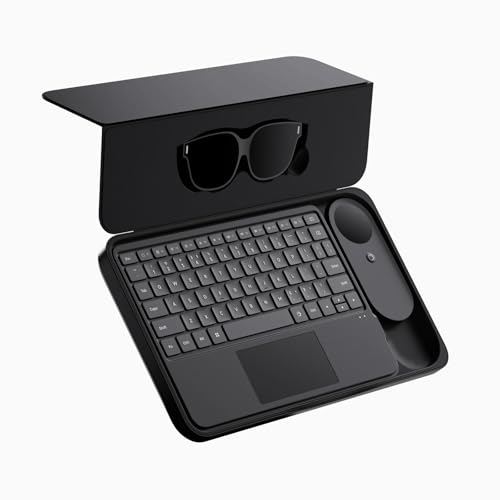
[Spatial Multi‑Touch Keyboard]: At just 6 mm thin, the 78‑key INAIR Keyboard supports single‑, double‑, and triple‑finger gestures to push or pull windows, realign your view, and adjust immersion. Dedicated hotkeys cover volume, brightness, and AR‑specific controls for intuitive operation.
[Powerful Accessory Ecosystem]: Enhance your experience with dedicated accessories including a compact portable case that stores all components for easy transport. The INAIR Hub docking station connects to an external power bank for simultaneous charging and continuous use, eliminating battery concerns during extended sessions. Complete the system with the Wakey PC Wake-on-LAN dongle: simply plug it into your computer, pair through your local network, and seamlessly wake your PC from sleep mode by logging into your INAIR account via INAIR Space for instant, uninterrupted remote access from anywhere.
[All‑Day Comfort with Prescription Support]: Three adjustable temple angles, two nose‑pad sizes, and SGS A+ 2.0–certified visual comfort make extended use easy. Official prescription lens options accommodate myopia, astigmatism, and other vision needs without sacrificing clarity.