
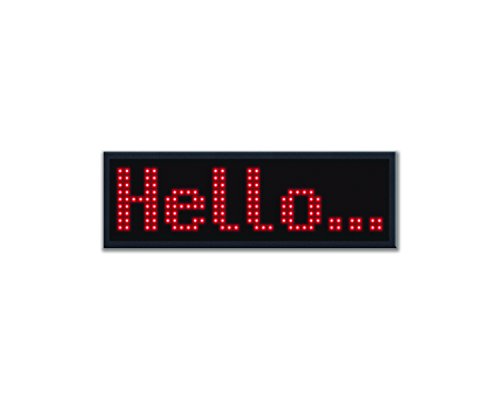
ION Smart Badge | Bluetooth Programmable Scrolling Badge with Bright LED Readout
Product Description
ION Smart Badge | Bluetooth Programmable Scrolling Badge with Bright LED Readout
- Bright, legible LED readout is visible across the room
- Program names or scrolling messages from any smartphone via free app-no computer needed
- Rechargeable battery delivers 12 hours of continuous use
- Store up to 8 pre-programmed names/messages in unit's memory
- Attaches with either magnetic fastener or safety pin
When you need to convey a message with clarity and impact, ION’s Smart Badge is the perfect solution.
Now you can display “TOUR GUIDE,†“INFORMATION,†“CAN I HELP†or even your name in bright red LEDs on a neat, compact badge that attaches easily to your shirt.
Forget messy markers and paper that bleeds through onto your clothes. Smart Badge programs wirelessly directly from any smartphone and shows off a bright display that’s clearly legible from across the room—without having to connect to a computer! People will notice you for the right reason, and you can say goodbye to the days of messy markers and paper waste.
The no-slip clip attachment is far more secure than stick-on paper, but it won’t poke holes in your good clothes. This is the way to do it.
Download the free ION Smart Badge app from the App Store or Play Store.
Controls- Micro USB: Connect the microUSB cable here to charge Smart Badge.
- Power On/Off: Move this switch to the up position to power on Smart Badge. Move the switch in the down position to power off Smart Badge.
- Metal Plate: Place the metal plate under clothing to secure to the magnetic panel.
- Magnetic Panel: Place the panel near the metal plate to magnetically connect.
- Pin: Use this to secure Smart Badge to your clothing.
- Brightness/Bluetooth Pairing: Press and release this button to cycle through the 3 brightness levels: 50%, 75%, and 100%. To enter Bluetooth pairing mode, press and hold this button for 2 seconds. To disconnect from a paired Bluetooth device, press and hold this button for 3 seconds.
- Message Locations: Select from one of 8 messages. Create and save custom messages to these locations using the Smart Badge app.
- Smart Badge
- USB Charging Cable
- Magnetic Back Plate
- Quickstart Guide
Technical Specifications
You might also like

MT Washi Masking Tapes, Set of 20, Bright & Cool Colors (MT20P002)

Socksmith Womens' Novelty Crew Socks "Avocado" - Parrot Green

Blue LED Name Tag,SOCW Reuseable Price Tag Rechargeable LED Business Card Screen with 44x11 Pixels USB Programming Digital Sign Temperature Display for Restaurant Shop Exhibition Nightclub Hotel
LED Name Tag, MECO Name Badge Rechargeable Pin Magenta Price Tag Reusable Business Card Screen with 4411 Pixels Programming Scrolling for Restaurant Shop Party Bar Exhibition - White
Red LED Name Tag,SOCW Reuseable Price Tag Rechargeable LED Business Card Screen with 44x11 Pixels USB Programming Digital Sign Temperature Display for Restaurant Shop Exhibition Nightclub Hotel