
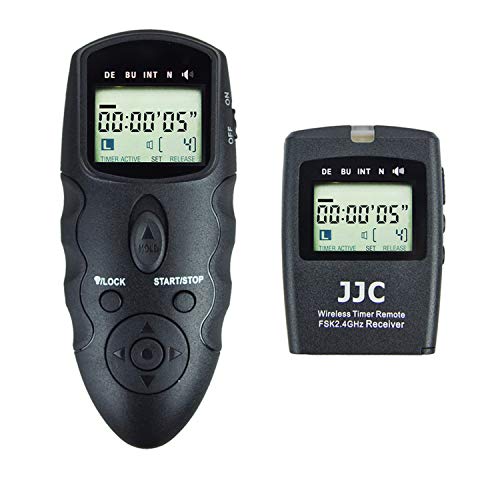
JJC Wireless Intervalometer Timer Remote Control Shutter Release for Canon EOS R1 R5 Mark II R5 R3 5D Mark IV III II 6D Mark II 7D Mark II 5Ds R 1Dx Mark III II 1Ds Mark III 50D 40D & More
Product Description
JJC Wireless Intervalometer Timer Remote Control Shutter Release for Canon EOS R1 R5 Mark II R5 R3 5D Mark IV III II 6D Mark II 7D Mark II 5Ds R 1Dx Mark III II 1Ds Mark III 50D 40D & More
1. Single shoot
(wired/wireless): Press the shutter button halfway to focus and press full to trigger shutter
2. Self-timer
(wired/wireless): Set the "DE" to the time you want to delay and press the "start" button
3. Continuous shoot timer (set camera to continuous shoot mode)
(wired): Full press the shutter button and slide it up to lock it for continuous shoot
(wired/wireless): Set the "BU" to the time you want and press the "start" button, if set 5s, the camera will keep continuous shoot within 5s
4. Long exposures timer (set camera's shutter speed to Bulb mode)
(wired): Full press the shutter button and slide it up to lock it for long exposures.
(wired/wireless): Set the "BU" to the time you want and press the "start" button, if set 8s, the camera will keep shutter exposure for 8s
5. Interval timer and number of shoots
(wired/wireless): Set the "INT" to the time you want and set the "N" to the numbers you want, if set 3s for the "INT" and 5 for the "N", the camera will take 5 pictures and the interval time between each is 3s
QA: I need 50 pictures, the exposure time for each picture is 10s, and the interval time between each picture is 5s, how set?
Re: (Camera in Bulb mode) Set the "BU" to 10s and "INT" to 15s, then set the "N" to 50 and press the "start" button.
Why the "INT" needs to be set 15s instead of 5s as you wanted the interval to be 5s, as in the default programs of this remote, the interval time includes the exposure time. So the 15s of "INT" minus the 10s of "BU" results in 5s real interval time between each picture.
Technical Specifications
You might also like

Sojoy iGelComfort Deluxe Gel Swivel Seat Cushion with Supportive Memory Foam 360 Degrees Rotating Seat Cushion for Home,Stool Chair,Office (Black, 13.5 * 13.5 * 1.75 inches)
Rocket Mesh Lacrosse Special Ops TapeSaver Butt End/End Cap (2-Pack)

AnySharp Smart Sizzors 'Cut Anything' Multi-Purpose Home and Garden Scissors
BLACKSTONE Tailgater Stainless Steel 2 Burner Portable Gas G+C3:C21rill and Griddle Combo, 1555, Total 35,000 BTUs for Indoor or Backyard, Outdoor, Patio, Picnic, Garden Cooking, Black

Super Z Outlet Black Velvet Ring Trays Accessory Foam Pads for Jewelry Showcase, Storage Displays, Home Organization & Decoration (2 Pack)

Elysium

HiLetgo 2pcs A4988 V3 Engraver Drive Shield 3D Printer CNC Drive Expansion Board for Arduino 3D Printer CNC
Capresso 488.05 Team Pro Plus Thermal Carafe Coffee Maker, One Size, Silver, 10 Cup