
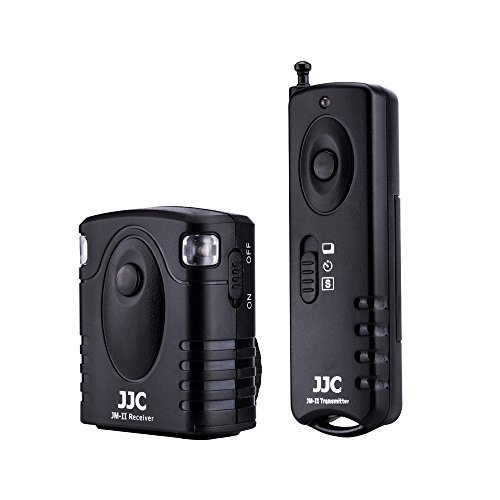
JJC Radio Wireless Remote Control for Fuji Fujifilm X-T20,X-T10,X-T100,XT2,X-T1,X-H1,X100F,X100T,X-A5,X-A3,X-A2,X-A10,X-E3,X-E2,X-E2S,X-M1,X-PRO2,XQ1,XQ2,GFX 50S Camera,Replaces Fujifilm RR-90 Remote
Product Description
JJC Radio Wireless Remote Control for Fuji Fujifilm X-T20,X-T10,X-T100,XT2,X-T1,X-H1,X100F,X100T,X-A5,X-A3,X-A2,X-A10,X-E3,X-E2,X-E2S,X-M1,X-PRO2,XQ1,XQ2,GFX 50S Camera,Replaces Fujifilm RR-90 Remote
- 16 possible radio channels, Operate on Radio Frequency 433 MHz, 1 transmitter can trigger multiple receivers
- Up to 30 meters range
- Can trigger cameras wireless or wired
- Can wirelessly trigger the camera shutter under 5 modes: single shot, unlimited continuous shots, bulb shot, 3 continuous shots and 5 seconds delay shot
- It fits Fuji Fujifilm XH1,XT2,XT1,XT20,XT10,XT100,X100F,X100T,X70,X-A2,X-A3,X-A5,X-A10,X-E3,X-E2,X-E2S,X-M1,X-Pro2,XQ1,XQ2,GFX 50S, Replaces Fujifilm RR-90 remote control
This Wireless Remote is designed for cameras that has a remote shutter socket. The system works at a 433MHZ frequency and has 16 available channels. In addition, this wireless remote system adopts a technology to allow the transmitter trigger the receiver without direct line of sight up to 30 meters. The transmitter can trigger the camera shutter at five modes: single shot, 5 seconds delay shot, 3 continuous shots, unlimited continuous shots and bulb shot/bulb lock.
It works with selected Fujifilm cameras as below:
Fujifilm X-H1,X-T2,X-T1,X-T20,X-T10,X-T100,X-PRO2,X100F,X100T,X30,X70,X-A1,X-A2,X-A3,X-A5,X-A10,X-E3,X-E2,X-E2S,X-M1,XQ1,XQ2,FinePix S1,GFX 50S
Important - How to use:
1. Install the CR-2 battery to the receiver and 23A battery to the transmitter. (Make sure to remove the plastic protective paper on the battery before installation)
2. Set the receiver and transmitter to the same channel (Normally the channel is already matched when you receive the package, so actually you don't need to set it, but it you ever reset the channel, make sure they are the same)
3. Once the batteries are properly installed and the channels are matched, when you press the shutter button on the transmitter, both the LED bulb on the transmitter and receiver will light up.(If not, please check if the battery is installed correctly or the battery is dead)
4. Once the transmitter matches the receiver, connect the receiver to the camera via the camera connecting cable which is included in the package,then set the transmitter into the working mode you want and finally press the shutter button to take a photo wirelessly.
Technical Specifications
You might also like

Fujifilm NP-W126S Li-Ion Rechargeable Battery

Wasabi Power Battery (2-Pack) Dual Charger Fujifilm NP-W126

(2-Pack) JJC Camera Soft Shutter Release Button for Fuji Fujifilm X-T20 X-T10 X-T2 X-PRO2 X-PRO1 X100F X100T X100S X-E2S X-E3/Sony DSC-RX1R II RX10 IV RX10 III/Lecia M9 M8 M7/Nikon Df F3 M2 and More

The Fujifilm X-T2: 120 X-Pert Tips to Get the Most Out of Your Camera

Fujifilm Long Eyecup EC-XT L for X-T1 (Black)
Fujifilm X-T1 X-T2 LCD Made in Japan Tempered Glass Camera Screen Protector, Patchworks ITG 9H Hardness Oleophobic Coated Anti-Scratch Anti-Fingerprint Tempered Glass Screen Protector
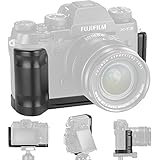
XT2 Grip Vertical Shoot Hand Grip QR Quick Release L Plate Camera Bracket Holder for Fuji Fujifilm XT2 X T2 X-T2

Pixel Shutter Remote Control RC/RR90 Remote Shutter Release Cable Cord for Fujifilm GFX 50S X-Pro2 X-T2 X-T20 X-T1 X-T10 X-E3 X-E2S X-E2 X-M1 X-A3 X-A10 X-E2S X100F X100T X70 X 30

LARMOR for Fujifilm X-E3 XE3 X-T10 X-T20 X30 LCD Screen Protector, from Tempered Glass Foil, Self-Adhesive, GGS 4th Generation

Expert Shield - THE Screen Protector for: FujiFilm X-T20 / X-T10 - Crystal Clear