
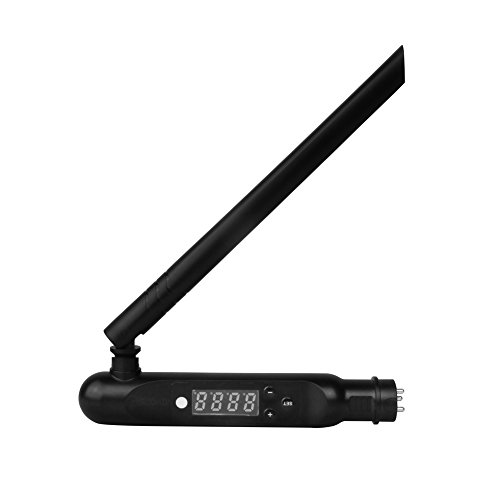
LGIDTECH Mi.Light DMX512 LED Transmitter,Only Work With DMX512 Console,Not Work With Computer Software and Oscilloscope
Product ID: B078DF8P9Q
Condition: New
Payflex: Pay in 4 interest-free payments of R200.75. Read the FAQ
Available in other options.
R 803
includes Duties & VAT
Delivery: 10-20 working days
Ships from USA warehouse.
Secure Transaction
VISA
Mastercard
payflex
ozow
Product Description
LGIDTECH Mi.Light DMX512 LED Transmitter,Only Work With DMX512 Console,Not Work With Computer Software and Oscilloscope
- 1)Set the Address:1. Hold "SET" until dXXX blinks. 2. Choose the address by pressing + or -, there are totally 512 addresses. 3. After choosing the address, hold "SET" until dXXX stops blinking.
- 2)Link: Choose the zone for the DMX light bulb first by pressing + or -, e.g. "CH12" means zone 12. Turn off the DMX light bulb, turn on again,after bulb lights up,press SET three times within 3 seconds, the light bulb blinks slowly three times with green color, now the light bulb is linked in zone 12, there are totally 16 zones.
- 3)UNLINK: Turn off the DMX light bulb, turn on again, within 3 seconds press SET five times, the light bulb blinks quickly 10 times with red color, now the unlink is done.
- 4)To adjust the first channel of any light under any zone(CHXX) or any address (dXXX), there are two steps to follow, first choose this light bulb, then find out the red color channel, you can get it from the this formula: [ dXXX+(CHXX-1)*5 ]/16 = Q
- 5)When the result Q is not a whole number, and the reminder is E, then press Q+1 under Scanner and choose this light bulb, then the red is the E channel, green is the E+1 channel, blue is the E+2 channel, warm white is the E+3 channel, cool white is the E+4 channel.
Technical Specifications
Country
USA
Brand
LGIDTECH
Manufacturer
Mi.Light
Binding
Tools & Home Improvement
ItemPartNumber
FUTD01
Model
FUTD01
Color
Black
Size
Transmitter
UnitCount
1
You might also like

Avatar: Fire and Ash - (Bonus X-Ray Edition)

Mosasaurs (Ancient Marine Life)

La Reina del Aire y la Oscuridad: Cazadores de sombras: Renacimiento 3

GRE Vocabulary Flashcards, Sixth Edition + Online Access to Review Your Cards, a Practice Test, and Video Tutorials (Kaplan Test Prep)

John Richardson: At Home

Animals and Psychedelics: The Natural World and the Instinct to Alter Consciousness

Appreciative Inquiry: A Positive Approach to Building Cooperative Capacity (Focus Book Series)

Imperial Boundaries: Cossack Communities and Empire-Building in the Age of Peter the Great (New Studies in European History)