
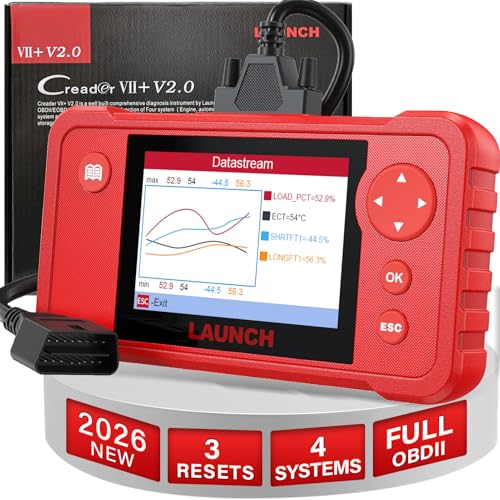
LAUNCH Creader VII+ V2.0 OBD2 Scanner Diagnostic Scan Tool, 2026 New Automotive Check ABS SRS Transmission and Engine Code Reader, 3 Reset Oil Service/Throttle Relearn/SAS Reset, Free Update
Product Description
LAUNCH Creader VII+ V2.0 OBD2 Scanner Diagnostic Scan Tool, 2026 New Automotive Check ABS SRS Transmission and Engine Code Reader, 3 Reset Oil Service/Throttle Relearn/SAS Reset, Free Update
- 【Wide Vehicle Coverage】: You can use this OBD2 scanner to diagnose a wide range of vehicles even 12V diesel cars. The Full OBD2 Functions can be used for all vehicles compatible with OBDII & CAN protocols, the Four Systems Diagnoses can be used for 2006 and newer vehicles, and the 3 Reset Functions can be used for 60+ brands. Notice: supported functions vary by vehicle's make, model and year. To confirm the diagnostic compatibility, please contact us via email: launch-aftersales @ outlook.com.
- 【New Added 3 HOT Reset Functions】: Now you can get more features and better hardware for the same price as the old one!! Creader VII+ V2.0 obd2 scanner has been upgraded to add 3 most used reset services for free: Throttle Adaptation, Oil Reset and SAS Reset. Optimize your engine performance with Throttle Adaptation, reset your oil life system with ease to save time and money on maintenance, and enhance your vehicle's handling and safety with SAS Reset.
- 【ENG/AT/ABS/SRS Diagnoses】: LAUNCH Creader VII+ V2.0 scan tool can easily access to the Engine, Transmission, ABS, and SRS to retrieve their DTCs, text or graphic live data stream and other ECU information. Once the detected problems are fixed, you can use this scan tool to clear the DTCs, and then the warning light will be off automatically.
- 【All 10 OBD II Test Modes】: Equipped with FULL OBDII functions, this OBD2 scanner for car is not limited to reading and clearing DTCs, but also supports advanced live data stream for focusing on any suspicious or symptom-specific data parameters, as well as O2 Sensor test and EVAP system test for detecting their faults in time to avoid emission problems.
- 【About Language & Update】: This OBD2 scanner diagnostic tool supports 10 different languages (English, Spanish, French, German, Italian, Russian, Japanese, Portuguese, Polish, and Korean). Notice: The upgrade needs to be finished with Windows-based computer ONLY via the TF card or USB cable. The “Password”, I. e. register code, can be found in “help” application after connecting the tool with PC.
How to Test by This Launch Creader VII+? 1. Retrieve the hard codes of ABS, SRS, Engine or Transmission while the warning light appears and locate problem areas for repair. 2. Clear the hard codes after figuring out the trouble and finishing all the repair work. 3. View live data about specific parameter which can be displayed in graphic or digital modes.
Technical Specifications
You might also like

LAUNCH VIII VI (16Pin OBD2 Cable)

Shinespout Oil Funnel Replacement for All Gallon and Quart Bottles - Patented Vented Bottle for an Spill Free Easy Pour - 6" to 10" Extendable and Flexible Neck for Hard Angles(Does't fit to Mobil 1)

FitSand (TM) Travel Carry Zipper Portable Protective Hard Case Cover Box for Launch Creader CRP123 Engine/ABS/SRS/Transmission Automotive Code Reader

CNIKESIN 500PCS Car Mixed Universal Door Trim Panel Clip Fasteners Auto Bumper Rivet Retainer Push Engine Cover Fender Fastener Clip
AUSDOM ANC7 Active Noise Cancelling Wireless Headphones Over Ear,Bluetooth Headset AptX Hi-Fi Sound Headphones with Microphone/Carrying Case for iPhone/Android/PC/TV Devices/Airplane
LAUNCH Creader 6001 OBD2 Scanner Car Code Reader Full OBDII/EOBD Scan Diagnostic Tool for O2 Sensor Test, On Board Monitor Test and Turn Off Check Engine Light

ACDelco 9748RR Professional Spark Plug Wire Set

Ausdom Wireless Bluetooth Headphones, On Ear Stereo Bass Bluetooth Headsets with Built in Microphone for PC/Cell Phones/TV-AH2

ACDelco 41110; Spark Plug - Ac No. 41-110 Professional Iridium Spark Plug Made by ACDelco (8-pack)
Launch X431 OBD2 Scan Tool VIII Vehicle Code Reader for ENG/at/ABS/SRS/EPB/SAS/Oil Service Light Resets