Linkfor
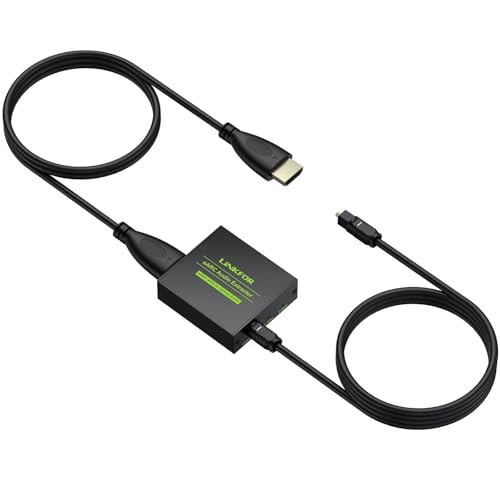
eARC/ARC Audio Extractor, HDMI eARC to Optical Converter with Audio Signal Indicator & 2.1M Cable, 192kHz, Dolby 5.1 DTS 5.1, for TV to Soundbar,Wireless Headphones,Home Theater(NO CEC)
Free shipping with 3 or more products in your cart
Payflex: Pay in 4 interest-free payments of R363.00. Read the FAQ
R 1,452
In stock
Duties, insurance and VAT included
Delivered in 10–20 working days —



Free shipping with 3 or more products in your cart
Secure checkout
Your payment is fully protected
Duties & VAT included
No surprise charges at the door
Tracked delivery
Track your order end to end
Returns support
30-day return window
Description
- eARC to Optical Audio Converter : Convert your TV's HDMI eARC/ARC signal into high-quality optical audio output(Note: TV's HDMI port must have eARC/ARC logo for compatibility.Enable CEC only for ARC TVs to activate HDMI features
- 192kHz High Resolution : Experience pristine sound with 24bit/192kHz sampling rate,perfect for connecting TVs to soundbars while maintaining studio-grade audio fidelity
- Plug-and-Play : No software or drivers needed. Advanced audio processing extracts pure digital audio from your TV while eliminating interference and delay
- Immersive Audio Formats : Supports PCM 2.0, Dolby 5.1 and DTS 5.1 with clear channel indicators. Enjoy theater-quality surround sound from any content source
- Universal Compatibility : Works with smart TVs, soundbars, home theater systems and wireless headphones(Note: Does not support CEC volume control due to fiber optic limitations)
- Perfect Accessory:For football watch parties, game day sports viewing, live match streaming with your TV, soundbar, PS5 and Xbox. Delivers clear synchronized audio for family sports nights without delay
Technical Specifications
Manufacturer
LiNKFOR
Model
XUNULK110
Weight
0.03 kg
Shipping & Delivery
Your order is shipped from the USA and delivered to your door in South Africa in 10–20 working days. All items are fully tracked.
Returns & Exchanges
We offer a 30-day return window. If something isn't right, contact our support team and we'll make it right.