

Lightning MHL to HDMI Cable Adapter, Mengyasi Plug & Play Lightning Digital AV to HDMI 1080P Cable Adapter for iPhone, iPad, Samsung Smartphone to Mirror On HDTV Projector
Product Description
Lightning MHL to HDMI Cable Adapter, Mengyasi Plug & Play Lightning Digital AV to HDMI 1080P Cable Adapter for iPhone, iPad, Samsung Smartphone to Mirror On HDTV Projector
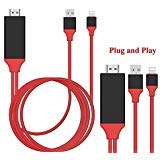
- ★3 in 1 Lightning Mirroring Cable★ Plug the HDMI connector into your HDMI-Enabled devices, Lightning (input) / HDMI (output) / USB 2.0 (Power Supply: 5V 1A). Connect a Smart Phone, Tablet or Other MHL Enabled Device to an HDMI TV. Plug and Play, NO jailbreak or Apps required.
- ★Compatible with IOS device and Android device★ Compatible with iPhone 7, 7 Plus; iPhone 6, 6s, 6 Plus, 6s Plus; iPhone 5, 5c, 5s, SE; iPad mini, mini 2, mini 3, mini 4; iPad Air, Air 2; iPad Pro; iPod Touch 5th/6th Generation. Support IOS 8.0 to IOS10(Not support IOS11). Support Samsung S3, S4, S5, S6, S6 edge and note 3, note 4, note 5, note7.Please note that it is normal to get hot while in use.
- ★Not Compatible with Apps which have "HDCP" video copyrights protection like Netflix, iTunes★ App Support -YouTube, Hulu Plus, IDMB, Quickflix, Family On TV, ABC, NBC, FOX, Microsoft Office and more videos downloaded and saved on your IOS and Samsung Devices for stream.
- ★Enjoy Big Screen via Lightning HDMI cable Adapter★ You can enjoy movies/Tv shows/ drama/photo, having a class or conference presentation, playing games on bigger screen(HDTV or Projector) in up to 1080p resolution via our lightning to HDMI cable, No more only oneself enjoy happiness by small screens and tiny speakers!
- ★Plug &Play MHL cable★ Plug and Play, while plug to your iPhone/iPad, the phones screen will pop out a "Trust" option, just click it then wait about 5-10 seconds for connection automatically; For Samsung/Huawei phone, you need open the phone "Developer Options" in setting, then choose "USB Debugging" and click "OK", trust the device.
Kindly Note:
Due to the copyright protection (HDCP), public sharing of the contents on the screen may be prohibited by some video service providers (such as Netflix, Amazon video, HULU and other websites). Please double check whether to accept that before purchase.
How to use:
This lightning to HDMI adapter has three ports, please make sure all ports are well connected, otherwise, it will not work.
1. Plug the HDMI port into the TV/Projector HDMI port.
2. Connect the USB port to a power adapter(5V 1A) or the projector or TV's usb port for power.
3. Plug USB female port into your iPhone/Samsung/iPad through charging cable.
4. Switch the tv/projector's output to corresponding HDMI.
5. For IOS System, the phones' screen will pop out a "Trust" option, just click it and it will connect automatically.
6. For Android Cellphones, please open your cellphone" Developer Options", then choose "USB debugging", then click"OK", it's done.Â
Support:
Support: iPhone 5 / 5S / 5C /SE /6 /6s / 6s plus / 7 /7 plus IOS 8.0 or above.Â
Support: iPad mini / mini2 / 3 / 4 / iPad air/ air2 / iPad proÂ
Support: iPod Touch 5th / 6th generation.Â
Support: Samsung S3 / S4 / S5 / S6 / Note 3/ Note 4 / Note 5
Support: Huawei P8 / P9
Support Resolution: 1080pÂ
Package Included:
1 x Lightning to HDMI CableÂ
1 x User ManualÂ
Technical Specifications
You might also like

YCTC 1080P 11-pin Micro USB to HDMI Adapter Cable with Video Audio Output Only for Samsung Galaxy S3/S4/S5 Note 2/3/4, Galaxy Tab 3 8.0 T310, Tab 3 10.1 P5210, Note 8.0 N5110, Note Pro 12.2

Varmax LED Home Projector Mini Compatible with Chromecast Fire Stick Iphone& Android Support HD 1080P Multimedia Video with Free HDMI Cable& Remote Control
Lightning to HDMI Cable Adapter, Kione iPhone Lightning Digital AV Adapter 1080P MHL to HDMI Converter for iPhone 7 6 6s Plus 5S SE and more
Cingk Lightning to HDMI Cable Adapter, Lightning MHL to HDMI Converter High-Speed 1080P HDTV Cable for iPhone, iPad, Samsung Smartphones -- Plug and Play
WiFi Smart Power Strip Surge Protector,Mengyasi Smart Power Socket with 4 AC Outlets and 4 USB Ports Compatible with Alexa Remote Control your Device from Android/ IOS Smartphone/ Tablets

Lightning to HDMI Adapter Cable, Bambud 6.5ft iPhone to HDMI Connector 1080P HDTV Cable, Lightning Digital AV Adapter Cord for iPhone X 8 7 6Plus, iPad, iPod to TV Projector Monitor, Plug and Play

Foseal 6.5 Feet MHL Micro USB to HDMI Cable MHL to HDMI 1080P HDTV Adapter Cable Cord for Samsung Galaxy S5, S4, S3, Note 3, Note 2 (NOT for Tab 3 7.0, Note 10.1, Note 3 N9008V)

Rumfo 6.5 Feet MHL Micro USB to HDMI Adapter Converter Cable 1080P HDTV for Android Devices Samsung Galaxy S3 S4 S5 Note 3 Note 2 Note 8 Note Pro Galaxy Tab 3 (11 Pin, Red)