

MHL Micro USB to HDMI 1080P HD TV Cable Adapter Special Shape 11Pin Cord for Samsung Galaxy S5, S4, S3, Note 3, Note 2,Only-Fit Specific Phone Models Stated in Ad Description Page
Product Description
MHL Micro USB to HDMI 1080P HD TV Cable Adapter Special Shape 11Pin Cord for Samsung Galaxy S5, S4, S3, Note 3, Note 2,Only-Fit Specific Phone Models Stated in Ad Description Page
- Plug and Play, No Driver required. Please be sure your device support MHL before purchasing.
- Mirror your phone through the standard HDMI output on a compatible TV. View Content/ Video/Photos of MHL mobile devices on HDMI enabled Smart TV / Projector / Monitor. You can enjoy the super big screen from your phones.
- Supported Video Resolution: 480i, 480P, 720i, 720P, 1080i, 1080P,Play back HD videos on a compatible TV.
- Connect the Micro USB cable into your devices with a power adapter(at least 5V 1A) to supply power for the HDMI connector,connect TV through the HDMI port,switch the TV to HDMI channel,Restart your devices,contents will be shown on TV,ready to watch video or play game
- Please feel free to contact us first if you have any problem after receiving this cable ,we will try our best to satisfy you!
Only Compatible with:Â
Galaxy S5 (SM-G900A, SM-G900D, SM-G900FQ, SM-G900I, SM-G900J, SM-G900K, SM-G900L, SM-G900M, SM-G900P, SM-G900R4, SM-G900R6, SM-G900R7, SM-G900S, SM-G900T, SM-G900T1, SM-G900V, SM-G900W8)
Galaxy S4 (GT-I9500, GT-I9505 ), Galaxy S4 TD-LTE (GT-I9507, GT-I9506 ), S4 Active
Galaxy S3 (i9300, SCH-R530X ), AT&T Galaxy S III (i747 ), Cricket Galaxy S III (SCH-R530C ), Sprint Galaxy S III (L710, SPH-L710T ), Straight Talk Galaxy S III (SCH-S968C), T-Mobile Galaxy S III (T999 ), U.S. Cellular Galaxy S III (R530), Verizon Galaxy S III (SCH-I535PP, i535 )
Galaxy S II (i9100, GT-I9100)
Samsung Galaxy Note 4, Note 3(N5100 N9000 N9006), Note 2 (N7100 N7105)Â
Galaxy MegaÂ
Galaxy Tab 3 10.1, Tab 3 8.0Â
Galaxy Tab S 10.5, Tab S 8.4Â
Galaxy TabPRO 12.2, TabPRO 10.1, TabPRO 8.4Â
Galaxy Note(8.0 inch tablet model; GT-N5100, GT-N5105, GT-N5120), Note Pro Â
Not Fit Galaxy S6/S6 Edge
Not Fit Galaxy S7/S7 Edge/S8/S8+/S9/S9+
Not Fit Galaxy Note 3 N9008V N900P/Note 5
Not Fit Galaxy S4 Mini/S3 Mini
Not Fit Galaxy Note 10.1/Tab 3 7.0
Not Fit Galaxy Tab 4 7''/ Tab 2/ Tab 4 8.0/Tab 4 10.1
Only support Samsung Galaxy 11 Pin MHL1.0/MHL2.0 Enabled Devices
Specification:
Â
Audio: 8-channel (e.g.7.1 surround) digital audioÂ
Give brilliant experience to youÂ
The group video conference projected to a big screen Video
How to operate:
Â
1. Connect the Micro USB(MHL) cable into your cell phone or tablet.Â
2. Plug the HDMI connector to the TV (Projector/Monitor) hdmi port.Â
3. Switch the TV to corresponding HDMI channel.
4. Connect the USB cable to a power adapter(at least 5V 1A) to supply power for the HDMI connector.Â
5. Restart your device after the whole connection finished.
Technical Specifications
You might also like

AFUNTA Android Tablet Cable Adapter Set-micro USB Otg; Mini USB Otg; Hdmi Female to Micro Hdmi Male;hdmi Mini-enabled Devices to Standard Hdmi
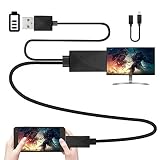
Yinguo Micro USB To HDMI Converter Cable 6.5 Feet 1080P HDTV Adapter for Samsung Galaxy S5 S4 S3 Note 3 (N5100 N9000 N9006) Note 8.0 Note 2 HTC LG Sony Android Phone (Not for Galaxy S6 S7 S7 Edge S8)
1080P HDMI AV HDTV Adapter Wireless Receiver Cord for Samsung Galaxy S7 /S7 Edge

UGREEN Micro HDMI to HDMI Adapter Cable Male to Male High Speed HDMI Cable Supports 3D 4K 60Hz 1080P Ethernet Audio Return Compatible for GoPro Hero 7 Black 6 Hero 5, Camera, ASUS Zenbook Laptop (6FT)

EXW MHL Micro USB to HDMI Cable Adapter Samsung Galaxy S3 S4 S5 Note 2 Tab3 for HDTV (5 Pin Adapter)
ANiceS OTG 5 Pin F/M mini Changer Adapter Converter USB Male to Female Micro USB

Dixie Ems Blood Pressure and Dual Head Stethoscope Kit (Pink)