
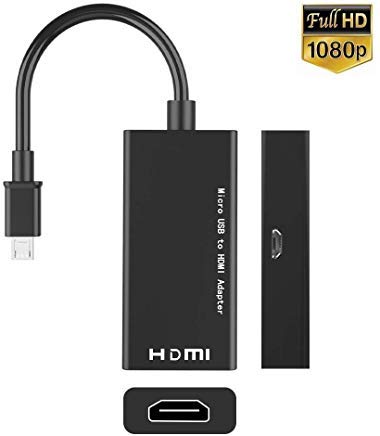
MHL Micro USB to HDMI Cable Adapter for Samsung Galaxy S3 S4 S5 Note 2 Tab3 For HDTV
Product Description
MHL Micro USB to HDMI Cable Adapter for Samsung Galaxy S3 S4 S5 Note 2 Tab3 For HDTV
Instructions
Step 1. MHL must be connected to Genuine S3 or S4 power adapter through the micro USB cable, the power adapter and the micro USB cable came with the phone. Computer's USB voltage may be not enough for power source.
Step 2. Use a good quality HDMI cable to connect the MHL adapter and TV, Please change the TV to HDMI channel ( consult your TV manual)
Step 3. It is all done, You should restart your S3 or S4.
Step 4. The MHL output doesn't need any settings, once you restart the phone then you can see all display on the TV from your phone.
Technical Specifications
You might also like

Cybertech MHL-to-Micro USB Adapter Tip (5 to 11-Pin) for Samsung Galaxy S3, S4, Note 2, 3
CyberTech Micro USB 5 Pin to 11 Pin HDMI HDTV MHL Adapter Converter For Samsung S3 I9300 SIII Note 2 II N7100

AFUNTA Android Tablet Cable Adapter Set-micro USB Otg; Mini USB Otg; Hdmi Female to Micro Hdmi Male;hdmi Mini-enabled Devices to Standard Hdmi

YCTC 1080P 11-pin Micro USB to HDMI Adapter Cable with Video Audio Output Only for Samsung Galaxy S3/S4/S5 Note 2/3/4, Galaxy Tab 3 8.0 T310, Tab 3 10.1 P5210, Note 8.0 N5110, Note Pro 12.2

Cable Matters 2 Pack Micro HDMI to HDMI Adapter (HDMI to Micro HDMI Adapter) 6 Inches

USB C to HDMI Adapter (4K@60Hz), uni USB Type-C to HDMI Adapter [Thunderbolt 3 Compatible] for MacBook Pro 2018/2017, iPad Pro/MacBook Air 2018, Samsung Galaxy S9/S8, Surface Book 2 and More - Gray

StarTech.com 3m Passive Micro USB to HDMI MHL Cable - Micro USB Male to HDMI Male MHL Cable - 1080p Video 7.1 Channel Digital Audio, Black
HDMI Cable 15 FT - Braided Cord - 4K HDMI 2.0 Ready - High Speed - Gold Plated Connectors - Ethernet/Audio Return Channel - Video 4K UHD 2160p, HD 1080p, 3D - Xbox Playstation PS3 PS4 PC Apple TV

Joyshare Micro USB OTG to USB Adapter - Micro USB Male OTG to USB Female Adapter - Silver - 1 Pack