
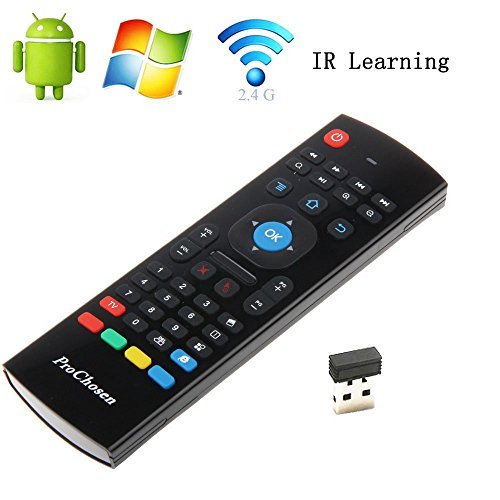
ProChosen MX3 Multifunctional 2.4 G Mini Wireless Qwerty Keyboard Fly Air Mouse Infrared Remote Control for Kodi Android TV Box, Smart TV, PC, Windows XP ,HTPC, Mac OS, Linux
Product Description
ProChosen MX3 Multifunctional 2.4 G Mini Wireless Qwerty Keyboard Fly Air Mouse Infrared Remote Control for Kodi Android TV Box, Smart TV, PC, Windows XP ,HTPC, Mac OS, Linux
- Smart and Portable. You can use it at home, enjoying PC multi-media entertainment or take it to the office, suitable for conference, Presentation & lecturing.
- Wide Control. With current 2.4GHz RF wireless technology, the transmission distance is up to 32 feet. You can control the devices at random within 32 feet.
- Strong Compatibility. It's compatible with Android TV Box , Smart TV Box, IPTV, Network Media Player, Game Player, set-top Box, Tablet, HTPC and PCTV.
- Sensitive keyboards. The Qwerty keys are soft and sensitive, easy to press, control , and jump to the interface what you want.
- 3-Gyro + 3-Gsensor, convenient to control in horizontal and vertical mode for motion games and typing.
Do you feel very annoyed as the USB keyboard can't control your devices well, use the ProChosen wireless MX3 air mouse remote to help you.
3 in 1 Super Combo
Works as a wireless keyboard, easy to type and search
Works as precise as a standard mouse on the screen of your devices
Works as an universal remote, can program some important functions from your TV remote
Easy to use, plug and play
1. Plug 2 AAA batteries into the slot
2. Plug USB dongle into the USB port of your device, wait for 20-60 seconds until the USB driver to be installed. A mouse cursor will move on the screen, means the pairing is successful.
3. If the pairing fails, press the OK and TV button at the same time until cursor move again, your devices will be connected.
How to program IR Learning
This remote has four colored IR learning keys can be programmed. Take learning Power On of TV remote for an example.
1. Ensure your TV remote supports NEC protocol for learning, batteries installed correctly and LED flash red
2. Set the MX3 remote and TV remote facing each other with top ends, keep the distance between them within 0.1 feet.
3. Press the TV button on the MX3 remote for 4-5 seconds until LED flashes fast.
4. Then press the Power button on the TV remote to learn 4-5 seconds until the LED on the MX3 remote starts to flash fast, press one of the four IR keys, the LED will keep red and not flash.
5. Then press the TV buttons on the MX3 remote to exit learning mode.
Specification
Transmission: 2.4 G RF wireless radio-frequency technique
Sensor: 3-Gyro + 3-Gsensor
Control range: 32 feet
Battery Type: AAA*2
Material: Plastic and Silicone
Size: 178*53*19mm
N.W: 100g
Package included
1 * 2.4 G air mouse remote
1 * USB receiver dongle
1 * User Manual
(2 AAA battery not included)
Technical Specifications
You might also like

ProChosen 2.4G Backlit Air Mouse Remote, Wireless Keyboard and Infrared Learning for Kodi Android TV Box, Smart TV, PC, HTPC, Windows, Mac OS, Linux
(Updated) 2.4GHz Wireless Mini Keyboard and Mouse with Infrared Remote Learning Remote Control QWERTY Air Fly Mouse Air Control for Android TV Box Smart TV G Box HTPC IPTV iOS PS3 Xbox 360

Rii MX3 Multifunction 2.4G Fly Mouse Mini Wireless Keyboard & Infrared Remote Control & 3-Gyro + 3-Gsensor for Google Android TV/Box, IPTV, HTPC, Windows, MAC OS, PS3

WisHome Waterproof Battery Operated Submersible LED Lights Multicolored RGB Color Changing Underwater Pool Lights with Remote Control for Pool Vase Christmas Wedding Party Holiday Lighting Pack of 2

[Updated] FeBite MX3 Pro 2.4G Kodi Remote with Backlit Mini Wireless Keyboard Mouse Air Control for Android Smart TV Box IPTV HTPC Mini PC Compatible with Windows iOS MAC Linux PS3 Xbox One 360
2.4G Air Mouse, LESHP 2.4G Fly Mouse Mini Wireless Keyboard Mouse Air Infrared Remote Learning For Android Smart TV Box G Box HTPC Mini PC Windows iOS MAC Linux Xbox 360 (Not for PS4 )

KasLin Wide 7MM Stainless Steel Cubic Zirconia Ring Wedding Band Size 5 to 11

KasLin Stainless Steel Golden Plated Cubic Zirconia Bracelet Chain Link for Women
ProChosen High-Speed HDMI Cable with Ethernet, Supports Audio Return Channel,1080p Projector PC Xbox PlayStation-3 Feet