
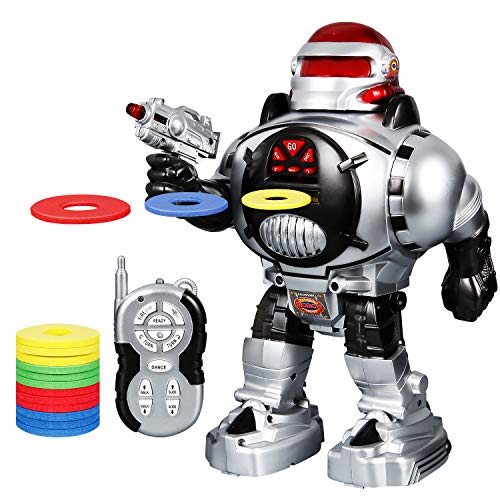
SGILE Kids Robot Toy, RC LED Combat Programmable Interactive Robotic for Kids Gift Birthday Present, Remote Control Shooting Dancing Walking, Silver
Product Description
SGILE Kids Robot Toy, RC LED Combat Programmable Interactive Robotic for Kids Gift Birthday Present, Remote Control Shooting Dancing Walking, Silver
- FIGHTING MODE: After pressing the "READY" button, the robot will enter into the combat mode, where the flying disc can be launched towards various directions in the air like a hero.
- SMART DESIGN: The SGILE super cool remote controlled robot has a variety of cool features including LED illuminated eyes, cool sound effects and a simulated machine gun, all of which make it fun and dynamic.
- INTELLIGENT PROGRAMMING: With the built-in keys, the robot can repeat a set of actions including walking, sliding, turning left, turning right and shooting which have been input by the user.
- TWO MOVEMENT TYPES: Walking and Sliding Modes allow the robot to go forward / backward, and turn left / right at the command of the user. The flexible arms make the robot more realistic.
- REMOTE CONTROLLER: Crafted out of high-quality, non-toxic ABS plastic for health safety, the cellphone-shaped controller gives you full control of the robot to make it dance, switch modes and change directions.
Dsecription:
The SGILE super cool remote controlled robot has a variety of cool features including LED illuminated eyes, cool sound effects and a simulated machine gun, all of which make it fun and dynamic.Â
It can also perform functions like walking, sliding, dancing, speaking and shooting.Â
Crafted out of high-quality, non-toxic ABS plastic for health safety and wear resistance, this robot guarantees years of exciting play.Â
The robot features rounded edges and soft curves to eliminate potential injuries.Â
The robot is a great gift for children.
Specification:
Material: ABS plasticÂ
Dimension: 31*20.5*13.5 CM
Color: Silver
Weight: 750 g
Age Recommendation: Ages 5 +
Note:
1. Keep the robot away from flames.
2. The robot requires 4 “AA†batteries(Not Included), and the remote controller requires 2 “AA†batteries(Not Included).
3. For better control effect, the remote controller should be aimed at the robot’s head position sensor.
4. When launching the disc, you should first press the “READY†button, and then press the button of the launching disc after the robot makes a voice command.
5. Switch on the robot, and press the 'GO' button on its chest before using all other buttons on the robot as well as the remote controller.
Package Content:
1x Remote Controlled Robot
1x Remote Controller
Technical Specifications
You might also like

RoboShooter by ThinkGizmos Remote Control Robot - Spare Foam Disks Only (pack of 16)

Robots, Robots Everywhere! (Little Golden Book)
LEANINGTECH X Syma S107G 3 Channel RC Radio Mini Alloy Remote Control Helicopter with Gyro for Children and Beginners

Haite Remote Control RC Robot Toys Interactive Walking Singing Dancing Smart Robotics for Kids Boys Girls Programmable Gesture Sensing Robot Kit

Click N' Play Remote Control Robot for Kids
AILUKI Remote Control Robots for Kids - Walking Control RC Robot Infrared Control Toys with LED Light,Singing and Dancing,Moonwalking and Gesture Sensing

WolVol (Large Version) 10 Channel Remote Control Robot Police Toy with Flashing Lights and Sounds, Great Action Toy for Boys

JITTERYGIT Robot STEM Toy | 3 in 1 Fun Creative Set | Construction Building Toys for Boys Ages 6-14 Years Old | Best Toy Gift for Kids | Free Poster Kit Included