
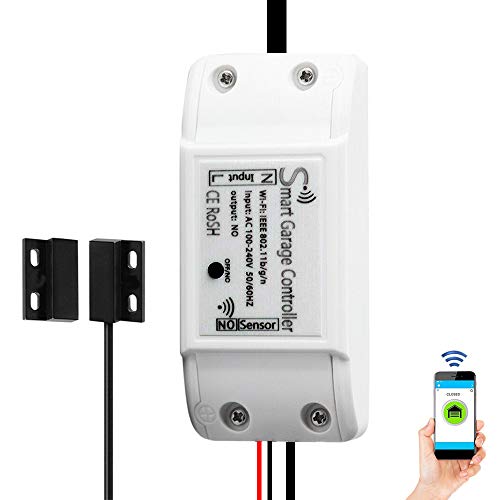
Smart WiFi Garage Door Opener Remote Controller, Smartphone App Control, Compatible with Alexa, Google Assistant and IFTTT, No Hub Required
Product Description
Smart WiFi Garage Door Opener Remote Controller, Smartphone App Control, Compatible with Alexa, Google Assistant and IFTTT, No Hub Required
Compatibility
Before order, please check the compatibility list in image 6&7.
If your model is not in the list, you can use a test wire (or Pliers) to short connect the terminals where your garage door wall buttons are currently connected. If your door opens or closes either, then it is most likely that this smart controller will work with your garage door opener.
Features
1.Just Tap
Get reminded that your garage door is open and use mobile app to securely close it from anywhere. Never forget to leave your garage open again.
2.Just Speak
Let Amazon Alexa or Google Assistant help you open your garage or gate. Let your guest through your garage or gate while you are cooking.
3.Just Drive
You can set smart scenes via smart life app and IFTTT app.1) Download and install both Smart Life and IFTTT apps. 2)Create the open garage door Smart Scene in the Smart Life application and 3), use the IFTTT applet called "trigger Smart Life Scene when you arrive Home" and choose and configure the "open garage door" Smart Scene within the IFTTT application.
Installation & Wifi set up
1) Mount the wifi garage door controller.
2) Attach Door Position Sensor Securely.
3) Connect the 2 Low Voltage Wires to your Current Opener.
4) Power up the controller and blue indicator light start flash for pairing.
5) Download and register Smart Life APP and start wifi set up. Tap the + icon on the top right of the app, select Add Manually> Security & Sensor> Sensor(Wi-Fi)> Tap confirm indicator rapidly blink. Input your network password and waiting few seconds for connecting. Once the process is completed, it will prompt you that you can remane the device.
Important Notes
1) Only 2.4GHz. Doesn't support Mesh and 5G WiFi network!
2) Please make sure the controller is flashing quickly, about 2 times a sceond. You can unplug and plug the controller few times to make it flash quickly.
Technical Specifications
You might also like

Wifi Switch,eMylo Wireless Remote Control Alexa Relay Switch for Household Appliances, Compatible with Amzon Alexa Echo Google Home Iphone Android App 5 pack

Smart Switch by Martin Jerry, Works with Alexa, Smart Home Devices Works with Google Home, 2.4G Wifi, No Hub, Single Pole Light Switch, Need Neutral Wire

Smart 3 Way Light Switch (Only One Needed), Meross Smart WiFi Light Switch Works with Alexa, Google Assistant and IFTTT, Light Switch with Remote Control, Voice Control and Timer, No Hub Required

TOPGREENER Motion Detector Light Switch, in Wall Sensor Switch, Occupancy Sensor Switch 500W LED CFL 1/8HP, Wall Plates Included, Neutral Wire Required, TDOS5, White, 2 Pack

Tuya Smart Switch eMylo 220V Wifi Light Switch 90-250V 1 Gang Wireless Remote Voice Control Relay Outlet Timer Work with Alexa IFTTT Google Assistant Smart Life App Via iphone Android 1pc
Smart plug, Gosund Mini Wifi Outlet Works With Alexa, Google Home & IFTTT, No Hub Required, Remote Control Your Home Appliances from Anywhere, ETL Certified,Only Supports 2.4GHz Network(4 Pieces)

MOES 3-Way WiFi Smart Switch for Light Fan,Compatible with Alexa and Google Home,No Hub Required,Smart Life APP Provides Control from Anywhere
Smart Plug Compatible with Alexa Google Assistant IFTTT for Voice Control, Teckin Mini Smart Outlet Wifi Socket with Timer Function, No Hub Required, White FCC ETL Certified

BV-Tech 10 Port PoE+ Industrial DIN Rail Switch (8 PoE+ Ports | Gigabit Ethernet & SFP Uplink) - 96W - 802.3at