
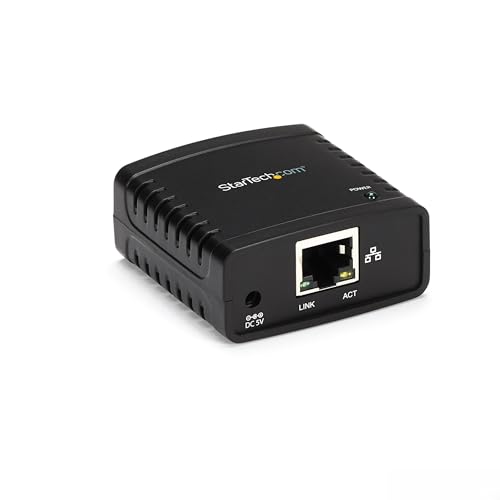
StarTech 1-Port USB 2.0 Network Print Server, 10/100 Mbps Auto-sensing, Wired Ethernet LAN USB Printer Server Adapter, TAA Compliant



Description
- WIRED NETWORK USB PRINT SERVER: Connect a single USB 2.0 printer to a wired Ethernet LAN (RJ45); 10Base-T, 100Base-TX auto-sensing to ensure a reliable connection, letting you print from any network computer, across the office or over the Internet
- MANUAL NETWORK SETUP REQUIRED: Configuration via web interface (static IP or DHCP) using LPR queue “LP1"; Not plug-and-play, requires intermediate network knowledge for installation; Access our online FAQs for additional helpful tips and instructions
- USB PRINTER COMPATIBILITY: Works with most USB 2.0 printers using standard drivers; Not compatible with USB hubs, multi-function printers with proprietary drivers, or printers requiring full bi-directional communication
- COMPATIBILITY: The USB to Ethernet print server is USB 2.0 compliant and works with macOS and Windows; It also supports LPR network printing and Bonjour Print Services for broad compatibility; Included software is compatible with Windows only
- PRINT FROM ANYWHERE: Print from any computer connected to the Ethernet; This print server doesn’t require a wired connection to a computer, however it must be connected to your networking device (eg. router or switch) with the included RJ45 network cable
This palm-sized print server makes it easy to share a USB printer with users on your network. It's the ideal solution for home or small office networks.
Reliable, cost-efficient network printing
Enjoy cost-efficient network printing for multiple users. The USB 10/100 Mbps print server lets you share one USB printer with multiple users on your network, instead of having to buy separate printers for each individual workstation.
Place your shared printer in a convenient location
With web-based management, you can set up and monitor the printer server through a web browser, so you can place your printer at any convenient shared location - there's no need to put your printer next to your computer. You can send print jobs to another user in your home or office, or even to a printer in another country.
Easy to use and install
Compact and lightweight, the print server is easy to install with its straightforward installation wizards and remote web-based management. You simply use a USB cable to connect the print server to your printer's USB port, then use an RJ45 networking cable to connect it to the rest of your network.
Supports LPR network printing and Bonjour Print Services
The printer server supports the Line Printer Remote (LPR) protocol which enables Internet printing. It also supports Bonjour Print Services, making it easier to find and configure printers on your network.
The PM1115U2 is backed by a StarTech.com 2-year warranty and free lifetime technical support.
Technical Specifications
Shipping & Delivery
Your order is shipped from the USA and delivered to your door in South Africa in 10–20 working days. All items are fully tracked.
Returns & Exchanges
We offer a 30-day return window. If something isn't right, contact our support team and we'll make it right.