
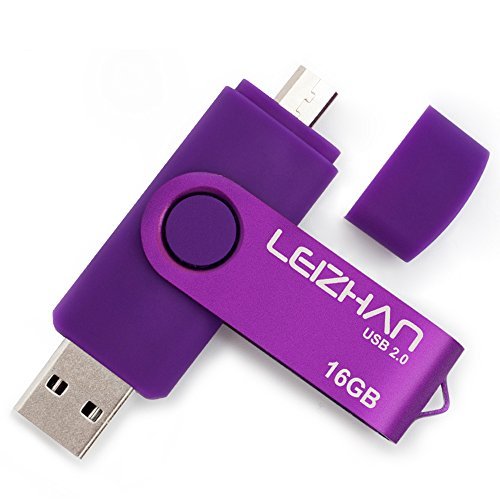
OTG Micro USB Flash Drive 16GB OTG Flash Drive 2 in 1 USB Pen Drive Memory Stick U Disk for Smart Phone, Tablet, PCs (Purple)
Product Description
OTG Micro USB Flash Drive 16GB OTG Flash Drive 2 in 1 USB Pen Drive Memory Stick U Disk for Smart Phone, Tablet, PCs (Purple)
Color:Purple
Feature:
1. Interface: USB 2.0
2.Storage Lifetime: More than 10 years of durable data storage
3.Use A-class chip, can be erased repeatedly for 100,0000 times
4.Easy to read and read in high speed ,no need drive/power supply only plug in
Quality testing:
All of our products will be tested before shipping.
And we adopt the most authoritative testing software H2test to ensure its function.
1.How to connect to mobile phone?
There are two ways to transfer data to this USB flash drive due to the different phones.
Way 1:
1.Connect the USB flash drive to your phone, and glide your finger downward on the phone's home screen to display the notifications panel.
2.Tap the information as "General USB Drive", "USB storage" or "OTG" alert, you will see some existing folders .
3.Click the folder to open the files, choose the files to "copy to" or "move to" the folder you want to. Glide your finger downward on the phone's home screen to display the notifications panel to back to the "General USB Drive" to eject or uninstall the flash drive.
Way 2:
1.After you plug it into your phone, look at the top of your phone for the USB symbol, it says "USB storage" connected. Go to "My Files" to select the videos, pictures or audios you will see your files there.
2.Click on "Copy" or "Move" by breaking down menu on the top right corner, then go to the folder you want to move your files to. At the top/bottom you will see 'Paste Here', once you do that, your files will be copied or moved to that folder.
3.Glide your finger downward on the phone's home screen to display the notifications panel to back to the "General USB Drive" to eject or uninstall the flash drive.
Technical Specifications
You might also like

Independant Intavenshan: Island Anthology

Rocket Science for Traders: Digital Signal Processing Applications

Barbie Signature Lebron James Kenbassadors Doll Collectible with Varsity Bomber Jacket Outfit & Accessories Including Headphones, Sunglasses, & More

The Paper Mill Girl

Weiman Stainless Steel Cleaner & Polish Aerosol, 12 Oz (Pack of 3)

A Rustic Riddle: A Witch Cozy Murder Mystery (Witches of Hemlock Cove Book 5)
Trudeau Structure Silicone Pro Muffin Pan, 12, Grey/Burgundy (09912094)

Under Armour Boys Ua Icon Camo Fz Hoodie