
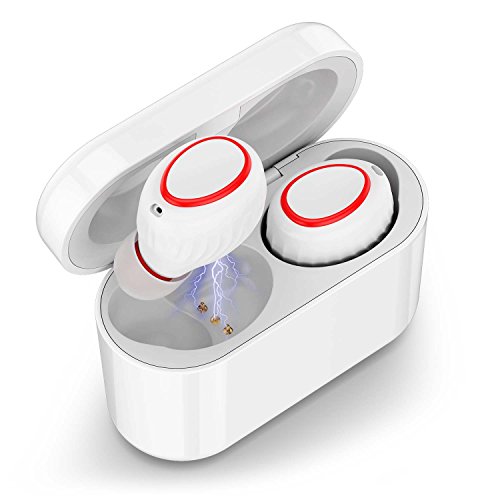
Wireless Earbuds, Soundmoov Mini True Bluetooth Earbuds Sweatproof Wireless Headphones with Mic and Charging Case Compatible with iPhone Samsung iPad and Most Android Phones(White)
Product Description
Wireless Earbuds, Soundmoov Mini True Bluetooth Earbuds Sweatproof Wireless Headphones with Mic and Charging Case Compatible with iPhone Samsung iPad and Most Android Phones(White)
- 【No Wires, No Limits】Soundmoov earphones adpot latest TWS technology to make wireless stereo synchronous connection pairing come true. Without any cord troubles, you can enjoy sports and high-fidelity music to the full.
- 【Simplified Setup】The cutting-edge technology of Soundmoov makes connecting your devices effortless-the Bluetooth earbuds automatically connects when removed from the case and disconnects when returned.
- 【Enhanced wireless connection】 Roam farther with extended Bluetooth range up to 49 feet without drop connection.If put your cell phone in your backpack, pants pocket, or far away, it doesn't affect the connection of wireless earbuds.
- 【Charging Case】 Equipped with mini and portable 500 mAh battery charging case, which can support 3 times fully charging for the wireless earbuds. You can enjoy up to 2.5 hours continuous music time after fully charged.
- 【What You Get】Soundmoov True Wireless Earphones, Charging Case, 3x EarTips, a Micro-USB Cable
No Wires.No boundaries.Soundmoov True Wireless earbuds
How To Pair(Initial Setup or After Reset)
1.Take out the earbuds from the charging case, they automatically turn on and you will hear a voice prompt "Power on" from each of the earbuds. And then the earbuds connect each other first and you will hear "Your device is connected" in both earbuds. See NOTE
2.Activate the Bluetooth on your phone and select "HV-358"to pair. You will hear a voice prompt "Your device is connected" on you LEFT earbud ONLY. Now your device is connected successfully. You can play music or make a phone call.
The next time, the Bluetooth earbuds automatically connects when removed from the case and disconnects when returned.
Note: If you the earbud does not turn on automatically, tap the MFB button once.
How To Use
Play/Pause Music or Voice podcasts: Tap the MFB button on either of the earbuds once during playing.
Next Track: Double Tap the MFB button on the LEFT earbud when playing .
Answer or End the phone call: Tap the MFB button on the LEFT earbud to answer the incoming call or end the call.
Reject the incoming call: Hold the MFB button on either of the earbuds.
Activate Google/Siri: Double Tap the MFB button on the RIGHT earbud when standby.
Charge the earbuds: Put the earbuds into the charging case and earbuds will automatically power off and start to charge.
*Reset the paring: If the earbuds could not connect each other, you can reset them to recover. After turn on the earbuds, Double tap the MFB quickly, the LEFT and RIGHT earbud will pair each other and the blue & red indicators will flash for 10 seconds. You will hear the voice prompt "Your device is connected" after paired.
Get the SoundMoov Edge:
24 Hour dedicated email support
100% customer satisfaction
Technical Specifications
You might also like

Cloudio S1 Bluetooth Sports in-Ear Headphones Best Wireless Stereo Earbuds Magnet IPX7 Sweatproof Bath Shower Waterproof Earphones with Mic for Running Workout 9 Hrs Noise Cancelling Headsets - Black

GZDL Mini Spy Camera WiFi - Small Hidden Cameras Wireless - Tiny Nanny Can HD 1080P - Covert Home Monitoring - Security Surveillance Cams Cell Phone iPhone App

15.6 inch Laptop Bag, changel Laptop Case, Briefcase Messenger Shoulder Bag for Men Women, College Students Business People Office Workers Professional Computer, Notebook, Table, MacBook Bag, Black

iPhone X Wireless Charger,ZOEVIEW Qi 10W Fast Ultra-thin Foldable Wireless Charging(No AC Adapter)for Samsung Note 9/S9/S9+/Note 8/S8,7.5W for iPhone XS MAX/XR/XS/X/8/8 Plus,5W All Qi-Enabled Phones
Mini Hidden Camera WiFi Small Portable Spy Camera Wireless Nanny Camera Indoor Video Recorder HD 1080P Home Monitoring Security Cam with Cell Phone App
JCHL Electric Arc Lighter USB Rechargeable Plasma Beam Lighter Electronic Lighter Long 360° Flexible Neck Windproof Flameless Candle Kitchen Lighter for Gas Stove BBQ Grill Camping Firework Silver

Wireless Earbuds, Losei True Bluetooth Headphones HD Stereo Mini in Ear Wireless Earphones Headset with Built-in Mic and Charging Case for iPhone Samsung iPad and Most Android Phones(White)