
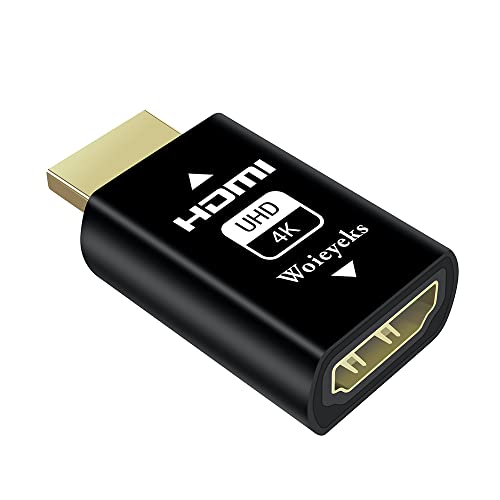
Woieyeks
4K HDMI EDID Emulator Passthrough Adapter,Female Port Connected to an External Display,for Extender/KVM Switch/AV Receiver/Video Splitters Support 3840x2160@60HZ,1080@60/120HZ(1 Pack)
Free shipping with 3 or more products in your cart
Alternative sizes, colours, or choices are currently unavailable.
Payflex: Pay in 4 interest-free payments of R180.25. Read the FAQ
R 721
In stock
Duties, insurance and VAT included
Delivered in 10–20 working days —



Free shipping with 3 or more products in your cart
Secure checkout
Your payment is fully protected
Duties & VAT included
No surprise charges at the door
Tracked delivery
Track your order end to end
Returns support
30-day return window
Description
- HDMI edid emulator-Bi-directional transmission signal,Signal source can be male or female,When your display is in multi-screen splicing mode, if one of the wires is loose or the screen is removed, the computer system will not re-identify or arrange the remaining desktops, Instead, the current settings are fixed.
- Plug & Play-No drivers,no software, no powered,Support hot swap.Low power consumption.The setup is very simple, just plug it into the KVM inline with your computer's HDMI, and every time you switch the signal input in the KVM to another device, the Windows system won't reset the monitor.
- Fixed EDID - It still passes video and audio signals correctly every time the device shuts down or power is started, stopped, toggled, or renegotiated for other operations. And to speed up the negotiation when the display is frequently turned off or on.The HDMI EDID emulator lock can be used to close the laptop lid remote control after specifying the resolution, and can be used as a virtual monitor when not using an external monitor.
- The screen client that can stably connect to 1080p/4K monitors is compatible with Mac mini, Raspberry Pi, NUC, Jetson Nano, keeping the monitor's EDID active when each device is accessing them remotely, works perfectly.the resolution supports 800x600@60Hz~3840x2160@60Hz. Even up to 4K -4096x2160@60HZ.
- Even with the real monitor turned off or disconnected, the emulator will tell Windows that it's still connected and Windows won't try to rearrange the desktop. It actually works perfectly with a DP (displayport/USB C) to HDMI adapter and doesn't require extra power. 24 hours technical maintenance consultation, you will get the fastest reply, HDCP is not supported!
Technical Specifications
Manufacturer
Woieyeks
Model
64df4a84-5fd5-4a21-93a0-7b04c571dc77
Color
Black
Size
4K-1 Pack
Height
1.1 cm
Length
3.8 cm
Width
2.1 cm
Shipping & Delivery
Your order is shipped from the USA and delivered to your door in South Africa in 10–20 working days. All items are fully tracked.
Returns & Exchanges
We offer a 30-day return window. If something isn't right, contact our support team and we'll make it right.