
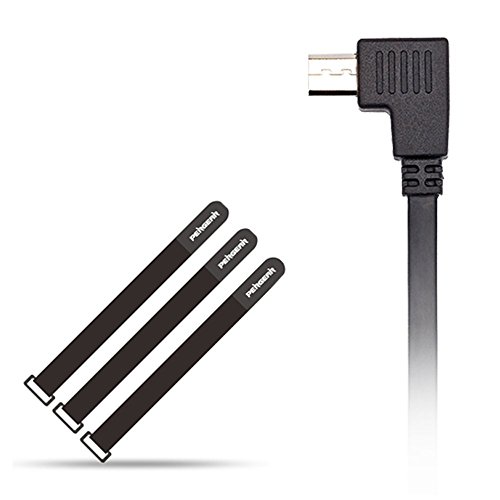
Zhiyun Crane Zhiyun Crane-M Control Cable for Sony Supports Taking Photos/Recording Videos/Focusing/Zoom in/Zomm Out - with PERGEAR Magic Stickers
Product Description
Zhiyun Crane Zhiyun Crane-M Control Cable for Sony Supports Taking Photos/Recording Videos/Focusing/Zoom in/Zomm Out - with PERGEAR Magic Stickers
- Support Functions: Take photos/ Record videos/Focusing/Zoom In/Zomm Out
- Compatible Cameras: Sony RX/H/QX series and All Sony Mirrorless Cameras
- CompatibleStabilizer: Zhiyun Crane and Zhiyun Crane-M (Firmware V1.50 and Above)
- BUYER BEWARE: For Some Sony Cameras(A6500 Dsc RX1RM2 For Example), the Multi USB Port has the wider portion inward and the narrower portion outward which means if you plug in the Angled Control Cable, it will Point Upwards and Block the Mic and HDMI Ports. Please Check before Your Purchase :)
BUYER BEWARE: For Some Sony Cameras(A6300 A6500 Dsc RX1RM2 RX-10 A7 Series For Example), the Multi USB Port has the wider portion inward and the narrower portion outward which means if you plug in the Angled Control Cable
it will Point Upwards and Block the Mic and HDMI Ports. Please Check before Your Purchase.
This WILL NOT work with the NEX-6 camera as the camera does not have the "PC remote" option the newer "a" series do. (Can't speak for NEX-5 or NEX-7 models but I assume the same.)
And no, you truly cannot use a basic cheap micro USB to micro USB cable. This Zhiyun cable has the proper pins switched in order for the connection to make the camera operate via USB.
1. Plug the control cable into the Micro USB port which is inside the tilt motor(Do NOT mis-plug it into the port on the handle).
2. Connect the stabilizer to computer or APP.
3. Select "Sony" in "Setting" Menu. Randomly touch the phone screen anywhere, and then press "Save" button. If you select "Sony" and press "Save" Directly, the App will not save the parameter:(
4. Turn off your Camera and Stabilizer.
5. Turn on stabilizer(Note the stabilizer must be powered on before the camera.)
6. Turn on camera.
Technical Specifications
You might also like

Upgraded PERGEAR Aluminum Mini Tripod Tabletop Stand for Zhiyum Crane V2 Zhiyun Crane-M Zhiyun Smooth Q Zhiyun Smooth 3 III II Moza Air Moza Mini-C Moza Mini-G Feiyu G4 Pro Godox A1 Phone Flash

Vktech Black Camera 323 Quick Release Plate

Zhiyun ZW-B02 Wireless Thumb Controller for Zhiyun Crane Crane-M Smooth-II Smooth 3 Smooth-Q Rider-M Gimbal Stabilizer - with PERGEAR Cleaning Cloth

Zhiyun Tripod Monopod for Crane 2/Crane/Crane M/Smooth Q/Smooth 3/Rider M/Evolution Gimbal Stabilizer with 1/4 Original

Zhiyun Crane V2 3 Axis Brushless Handheld Gimbal Stabilizer 3 32Bit MCUs Brushless Motors with Encoders for Mirrorless Camera Sony A7 Series Panasonic LUMIX Series Nikon J Series Canon M Series
BLACK 50CM FPV HDMI Cable Micro HDMI male Interface 90 degree to Standard HDMI male Interface for Gopro A7RII A7SII A9 A6500 A6300(REVERSE SOCKET OF A6000)

Neewer Dual Hand Grip for Neewer Crane M Zhiyun Crane M 3 Axis Hand Stabilizer Non-Slip Durable Camera Gimbal Space Aluminum Alloy Black

Zhiyun Wireless Remote Control for Zhiyun Crane-Plus/Crane V2/Crane-M Gimbal Stabilizer(ZW-B02)
Zhiyun Universal Mini Tripod Stand for Crane 2 Stabilizer Crane V2 M Smooth Q Gimbal with 1/4 Screw

BeStableCam Upgraded Aluminum Alloy V2 Tripod Desktop Stand for Gopro DSLR Camera Zhiyun Smooth Q Zhiyun Smooth 3 III Moza Air Feiyu G4 Pro G5 V2 3-Axis Gimbal