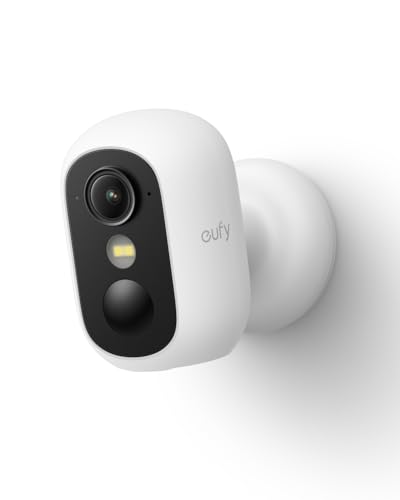


eufy Security eufyCam C35, Wireless Security Camera, Outdoor and Indoor, Magnetic Mount, Color Night Vision, Local Storage, No Monthly Fee, IP67, Supports Solar Panel, White
This item may be available in a different size, colour, scent, version or platform:
eufy Security eufyCam C35, Wireless Security Camera, Outdoor and Indoor, Magnetic Mount, Color Night Vision, Local Storage, No Monthly Fee, IP67, Supports Solar Panel, White
Magnetic & Screw-free Mounting: Enjoy effortless installation in seconds. The powerful magnetic base snaps onto any metal surface for a rock-solid hold, or can be placed on any flat surface. No drills, no damage, perfect for both indoors and out. NOTE: For smooth operation of your eufyCam C35, please update your eufy App to version 5.2.10_16477001 (iOS) or 5.2.10_17014 (Android) or newer.
Spotlight-free Color Night Vision: See true colors, even in total darkness. Our advanced sensor technology reveals critical details like faces and license plates without any spotlight, ensuring clear evidence and zero disturbance.
All Features, Zero Monthly Fees: Unlike other brands, your one-time purchase includes everything—no mandatory subscriptions for cloud storage, no extra charges for AI, and no battery replacement costs.
Local Security, No Monthly Fee: Store footage locally on a microSD card (32 GB to 256 GB supported) for secure storage with no monthly fee. Note: microSD card not included. Note: The camera is not compatible with HomeBase 2. For detailed setup instructions and full compatibility information, please see the "User Guide" in the "Safety Documents" section below.
Smart Detection, Instant Alerts: AI detects people, vehicles, pets, and activity zones. Get instant alerts from your security camera outdoors and indoors, and keep every corner under watch.
Stable 2.4 GHz Wi‑Fi Connection: Enjoy reliable transmission and instant alerts with 2.4 GHz Wi‑Fi connectivity. Keeps your camera connected smoothly for continuous monitoring without signal drops.
Note: The camera is not compatible with HomeBase 2. For detailed setup instructions and full compatibility information, please see the "User Guide" in the "Safety Documents" section below.