
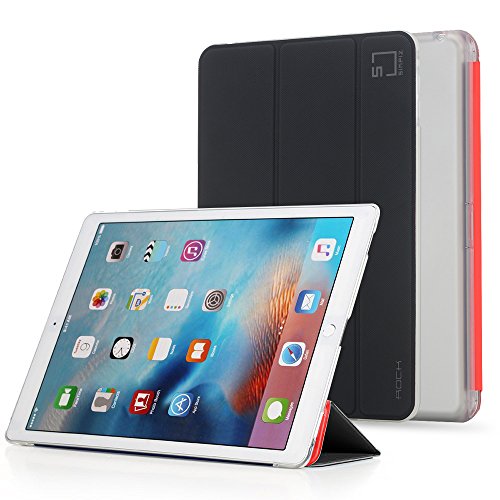
iPad Mini 4 Case; Simpiz Gladiator Slim Fit Protective Case Cover Shell with Flip Stand and Auto Wake Sleep Function for Apple iPad Mini 4, 7.9 inch iOS Tablet (Reversible Front Cover)

Product Description
iPad Mini 4 Case; Simpiz Gladiator Slim Fit Protective Case Cover Shell with Flip Stand and Auto Wake Sleep Function for Apple iPad Mini 4, 7.9 inch iOS Tablet (Reversible Front Cover)
- SMART REVERSIBLE CASE: The front cover with auto wake/sleep feature is detachable from the back case, and put back on the other side. Black or red, both look stylish and classy.
- 360?? PROTECTION: Premium PU leather and semi-transparent TPU rubber protect your Apple iPad Mini 4 from scratches and drops, leaving no fingerprints or smudges.
- TWO-ANGLE STANDS: This iPad Mini4 protective skin can be folded up as keyboard stand for comfortable typing, or as viewing stand for video playing.
- MAGNETIC ADHESION: The magnetic front cover of this ultra slim and lightweight case is closely adhesive to the screen. The magnetism also keeps the folded-up stand steady.
- PRECISE CUTOUT: Full screen display with precise cutouts for ports, jacks, cameras, speakers and microphones, for best ventilation and easy installation.
INSTRUCTION FOR INSTALLING
Step 1. Clean the screen with the provided white microfiber cloth to remove stains, dust and fingerprints.
Step 2. Further clean the screen with the provided wet alcohol pad, and then completely dry the screen using the provided cleaning wipe.
Step 3. Peel off the provided dust-collect film and gently use it to remove all the infinitesimal dust and lint on the screen.
Step 4. Keep the layer labeled 1 of the screen protector facing down, peel it off, and then slowly apply the blue plate onto the screen. Please precisely align the holes on the plate with the holes on your cell phone before applying.
Step 5. Use the fingers to press on the protector, starting from the center to the edges, to secure the application. The protector should automatically attach to the screen.
Step 6. Use the white microfiber cloth to press the protector to squeeze any bubbles out of the edges.
Step 7. Peel off the layer labeled 2, and the mission is accomplished.
CAUTION:
1. Please precisely align the holes on the protector with the holes on the cell phone screen when installing. If there is any misalign occurs, you can always tear off the protector and reinstall it on the screen.
2. In case of the appearance of a few bubbles, try to press the protector using the white microfiber cloth, and push the bubbles out of the screen from the edges. If the bubbles still remain, please tear off the protector and repeat Step 4 to 7.
Technical Specifications
You might also like
Simpiz® Wireless Bluetooth Sport Earphone Earbud In-Ear Headphone Headset with Built-in Mic for iPhone, iPod, MP3, iPad, Samsung and more Android Windows Smartphone and Tablet

Infernal Innovations Magnetic Car Air Vent for Mobile Devices with Metal Plate

Hardwood Activated Charcoal Powder, 8 Oz. Very Fine, Organic From USA Hardwood. Raw Food Grade, Natural Teeth Whitener, Detoxifi
USB Type C Cable, BRIDGEGEN 6.6 Ft/2M Braided Cable with Reversible Connector for Samsung Galaxy S8, LG G5 G6, HTC 10, Moto Z, Google Pixel, Nexus 5X, Macbook 12 inch, and Other Type C Devices, Black

[iPhone 6/6S] Wallet Case with Drop/Shock Protection - Card Holder for Up to 8 Cards - Quickdraw by HUSKK - Black [Eco Leather TPU]

Pinnacle Systems RFID Blocking Sleeves (10 Credit Card and 2 Passport Protectors) Top Identity Theft Protection Travel Case Set Smart Holders Fit Wallet, Purse and Cell Phones (Men and Women)

iPhone 6/6S Screen Protector, Simpiz® Shield Crystal Clear Ultra Thin Shatterproof Flexible Glass Screen Cover for iPhone 6 and iPhone 6S - Blue Light Cut for Eye Protection
Amaz247 Windshield Universal Smartphone Car Mount Holder Cradle for iPhone 6, 6 Plus, 6S, Edge 5S SE Samsung Galaxy S5, 4, 3, S7, 6 Edge Plus, Note 5, 4, 3 & other Smartphones
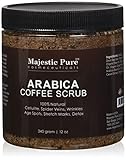
Arabica Coffee Scrub From Majestic Pure Helps Reduce Cellulite, Wrinkles, Stretch Marks, Spider Veins, Acne & Age Spots, 100% Natural Treatment & Care, Skin Detox, 12 Oz, Try Risk Free Today!